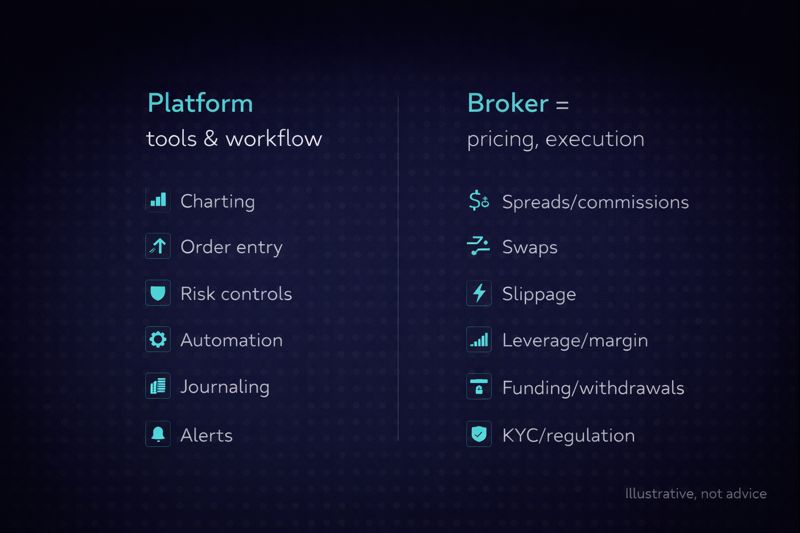
Most “best forex platform” lists are missing one key detail: the “platform” is often just the interface, while the broker controls your pricing, execution, leverage, and withdrawals. That’s why two traders can both use MetaTrader and still have completely different trading results, because they’re on different brokers.
This post helps you pick the right platform the practical way: choose your trading style, define the must-have tools, then validate costs and execution with a quick testing checklist. Along the way, you’ll see where newer platforms like TradeLocker fit best (especially if you care about a modern workflow and built-in risk controls), without pretending there’s a single platform that’s perfect for everyone.
The best forex trading platforms at a glance
If you want a fast shortlist, start here. These are the most common “best-fit” choices depending on what you value (workflow, automation, charting, and simplicity).
Quick overview
| Platform | Best for | Why it makes the shortlist | Watch-outs |
| TradeLocker | Traders who want modern execution + built-in risk workflow | TradingView-powered charting, on-chart trading, SL/TP + risk calculator, multi-device experience | Availability depends on which broker/firm offers it |
| MetaTrader 5 (MT5) | Traders who want the biggest ecosystem | Huge indicator/EA library, widely offered by brokers | UI can feel dated; workflow varies by broker setup |
| TradingView | Charting + alerts (and trading through supported brokers) | Best-in-class charting, ideas, alerts, clean UX | Execution depends on broker integration; not every broker supports trading from it |
| cTrader | ECN-style workflow + advanced order control | Strong execution-oriented interface, depth-of-market style tools | Not offered by every broker |
| Broker-native platforms (e.g., OANDA/FOREX.com style) | One provider, one login simplicity | Everything in one place: account + trading + funding | Portability is lower; features vary widely |
| Pro multi-asset terminals (e.g., IBKR-style) | Advanced traders who want deep tools | Broad market access, powerful toolset | Steeper learning curve than most FX-first platforms |
This table is intentionally platform-first. You’ll still need to pair your platform with a broker you trust, because that’s where spreads, commissions, swaps, and execution live.
What counts as a “forex trading platform” (and why this matters)
A forex trading platform is the software where you analyze price, place orders, manage risk, and review performance. A forex broker is the regulated entity that holds your account, provides quotes, routes orders, and handles deposits and withdrawals.
That difference matters because the best platform is rarely the whole story. If your broker widens spreads during volatile sessions, adds high swap costs, or makes withdrawals painful, the slickest platform UI won’t save you.
The 4 platform types you’ll see on best forex platform lists
Most options fall into one of these buckets:
- Execution-first platforms focus on getting in/out fast with clean order entry and trade management. This is where newer platforms like TradeLocker tend to win, because the workflow is designed around placing and managing risk without friction.
- Charting-first platforms prioritize analysis and alerts. TradingView is the obvious example. It’s often the best place to build a bias and set alerts, even if you execute elsewhere.
- Broker-native platforms are built by a broker to keep everything in one place. Some are excellent, some are basic, and the feature set varies a lot.
- Pro multi-asset terminals are powerful but complex. These are great if you want maximum control and market access, but they can be overkill if your goal is simply to trade major FX pairs cleanly.
How we’re thinking about best (so you can choose faster)
There’s no universal best platform. There’s only the best platform for your strategy, your risk limits, and your workflow.
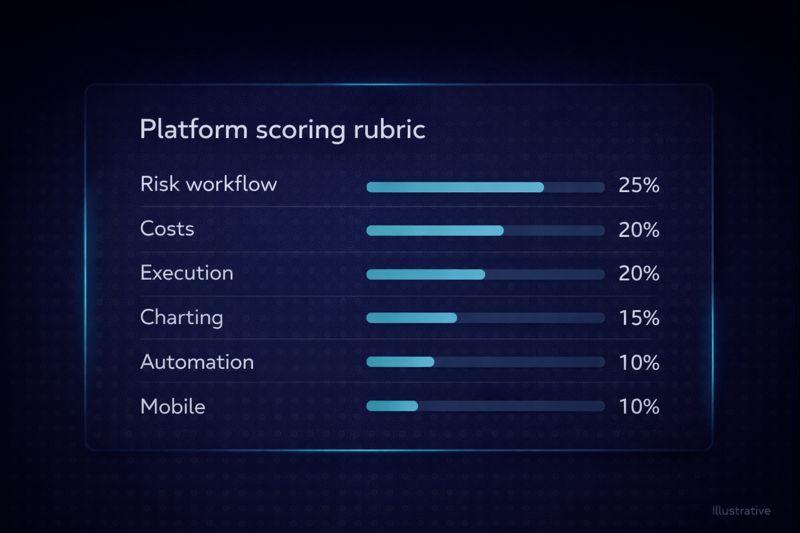
Here are the criteria that actually move the needle:
- Risk workflow: Can you set Stop Loss and Take Profit quickly, ideally before you enter? Do you clearly see position size and risk in $ and %?
- Real costs: Spreads, commissions, swaps, and non-trading fees. Most traders only look at spreads and miss the rest.
- Execution confidence: How does the platform behave during news and high volatility? Does it freeze, lag, or require too many clicks?
- Charting and decision tools: Clean multi-timeframe analysis, indicators, templates, alerts.
- Automation (optional): Do you need bots/EAs/scripts, backtesting, or at least alerts and semi-automation?
- Device flexibility: Can you trade the same way on web/mobile/desktop without re-learning the interface?
Best forex trading platforms (reviews)
To keep this objective, each review answers the same questions: what it’s best for, what it does well, what to watch for, and how to validate it quickly.
TradeLocker: best for modern execution + built-in risk control
TradeLocker is a next-gen trading platform designed around a simple idea: if risk management is hard to apply, traders won’t apply it consistently. That’s why the platform leans into a streamlined order workflow that helps you see Stop Loss/Take Profit clearly and understand risk before you commit.
One of the biggest advantages is the TradingView-powered charting experience, which makes analysis smoother for traders who prefer modern charting and clean layouts. From there, TradeLocker’s strength is the way it connects charting to execution. Features like on-chart trading, a dedicated order panel, and a risk calculator can reduce the “analysis → execution” gap where many mistakes happen.
TradeLocker is also designed to work across devices, so you can move between desktop and mobile without feeling like you’re using a totally different platform. And for traders interested in automation, TradeLocker includes a “Studio” concept aimed at building and running trading bots with less friction than traditional setups (availability and live access can vary by offering).
What to validate before committing:
Confirm which broker/firm offers TradeLocker in your region, what products are available (spot FX vs CFDs), and the full cost schedule (spreads, commissions, swaps, and withdrawals).
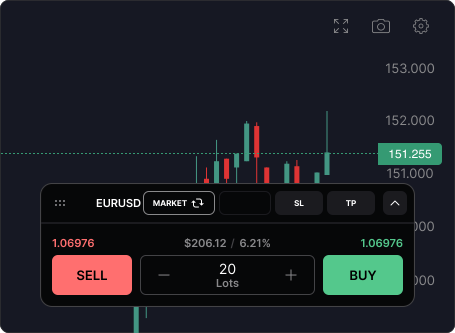
MetaTrader 5 (MT5): best for ecosystem + widespread broker support
MT5 remains one of the most common answers to “best forex platform” because it’s everywhere. If you want access to a massive world of indicators, scripts, and automated strategies, MT5 has an advantage simply because of adoption.
Where MT5 shines is flexibility: you can build templates, customize indicators, and (with the right setup) run automated systems. It’s also widely available across brokers, which makes it easy to find a compatible account.
The downside is not that MT5 is “bad.” It’s that the experience depends heavily on your broker, and the UI/workflow can feel less intuitive for traders who want clean, modern execution. If you’re the kind of trader who overthinks entries because the order ticket is cluttered, MT5 can amplify that friction.
What to validate before committing:
Check the broker’s actual trading conditions on MT5 (spreads, commissions, minimum lot size, swaps), and test execution during a volatile session on demo first.
TradingView: best for charting, alerts, and idea development (execution depends on broker)
If your trading starts with analysis, TradingView is hard to beat. Many traders use it as their “home base” for charting, alerts, and multi-timeframe structure because it’s fast, visual, and consistent.
Where traders get tripped up is assuming TradingView is automatically a full trading platform. In reality, TradingView can be charting-only for some traders, while others can trade directly through supported broker connections. Whether you can execute trades inside TradingView depends on your broker and region.
Even if you don’t place orders there, TradingView can still be the best place to do your prep. Then you execute on the platform that gives you the best trade management and risk workflow.
What to validate before committing:
Confirm whether your broker supports TradingView trading in your region and whether order management (SL/TP edits, partial closes) matches your style.
cTrader: best for execution-oriented traders who want advanced control
cTrader is often chosen by traders who care deeply about execution workflow and order management. The interface tends to be built around the idea that you should be able to place and manage trades efficiently, with tools that appeal to active traders.
For many, cTrader feels more “modern trading terminal” than legacy platforms. It can be a strong choice if you’re frequently scaling in/out, managing multiple positions, or you want a platform that emphasizes trade control.
The catch is simple: not every broker offers it, and the overall experience still depends on broker conditions.
What to validate before committing:
Make sure your preferred broker offers cTrader with competitive costs on the pairs you trade, and run your same “test script” (below) to evaluate speed and workflow.
Broker-native platforms: best when you want one provider for everything
Many brokers promote their own web and mobile platforms, often alongside MT4/MT5 and sometimes charting integrations. This route can be excellent for traders who want a single login for trading, funding, and account management, and who value a guided experience over maximum customization.
The trade-off is portability. If you get used to one broker’s native platform and later switch providers, you may have to re-learn everything. Also, feature depth varies dramatically: some broker platforms are outstanding, others are mostly “basic order entry plus a chart.”
What to validate before committing:
Don’t just test the chart. Test the entire lifecycle: funding, placing orders, adjusting SL/TP, reviewing statements, and making a withdrawal.
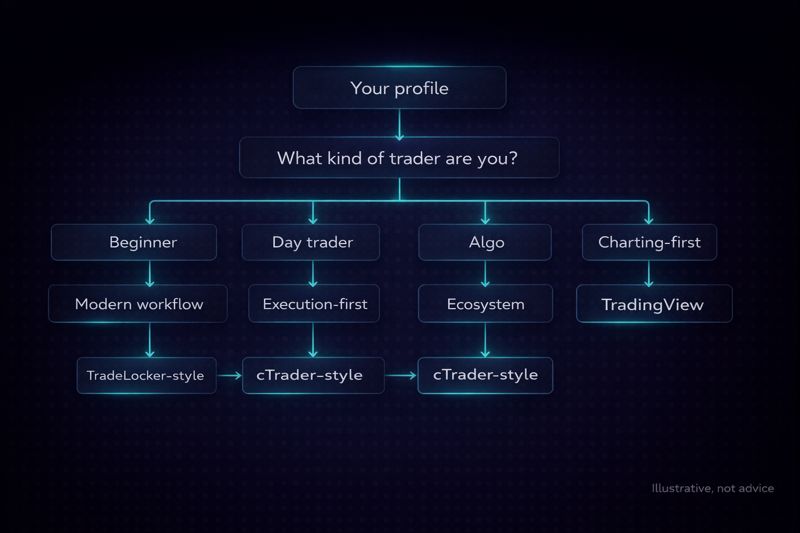
Best forex trading platform for your trading style
Instead of asking “what’s the best platform,” ask: “what platform makes my strategy easiest to execute correctly?”
1. If you’re a beginner
Beginners usually need three things more than “advanced tools”: clarity, fewer mistakes, and a workflow that makes risk management obvious. Platforms that emphasize a clean order ticket, quick SL/TP setting, and understandable sizing tend to work better than platforms that throw every setting at you on day one. This is where a modern experience like TradeLocker can be a strong fit, especially if you want your platform to “nudge” you toward good risk habits.
2. If you’re day trading
Day traders benefit from speed and control. You want fast order entry, easy modifications, and a layout that helps you manage positions without losing context. Your best choice will depend on whether you’re more execution-first (you want clean trade management) or charting-first (you want deeper visual analysis and alerts).
3. If you’re scalping
Scalping is less forgiving. Tight spreads, reliable execution, and minimal friction matter more than fancy indicators. The platform should let you place and edit orders quickly, but you must validate trading conditions with the broker, because scalping performance is often dominated by costs and execution rather than platform aesthetics.
4. If you swing trade
Swing traders usually care more about stable charting, alerts, and clean analysis than ultra-fast order entry. If you swing trade, choose the platform that makes your planning simple, then ensure your broker’s overnight swaps and holding costs match your approach.
5. If you automate (or want to)
If your strategy relies on automation, choose the ecosystem that supports it cleanly. MT5 is the “default” for many because of the existing library, while newer approaches (like TradeLocker’s Studio concept) are attractive if you want a more modern experience and fewer setup headaches. The right choice depends on how technical you are and how much you want to build versus just run something proven.
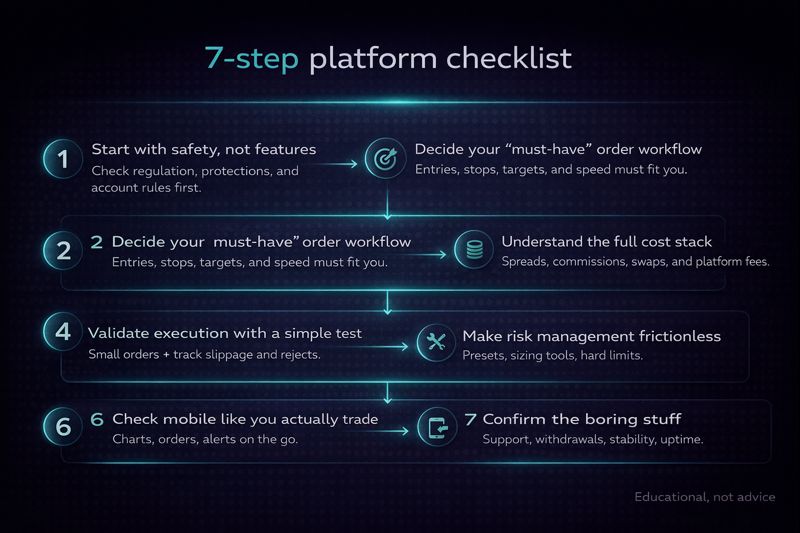
How to choose the best forex trading platform (7-step checklist)
This is the part most “top platform” posts skip. It’s also the part that prevents expensive mistakes.
✓ Step 1: Start with safety, not features
Before you fall in love with a platform UI, confirm the broker behind it is reputable and properly regulated for your jurisdiction. A great interface doesn’t protect you from a bad counterparty.
✓ Step 2: Decide your “must-have” order workflow
Your platform should make three actions easy: place an order, set SL/TP, and manage the position. If those three steps feel clunky, you’ll either hesitate or make avoidable mistakes. Look for platforms that make SL/TP placement fast and clear, ideally with risk shown in dollars and percentages.
✓ Step 3: Understand the full cost stack
Spreads are only one line item. Commissions, swaps (overnight financing), and non-trading fees can matter just as much depending on your holding time and frequency. A platform that helps you trade better can still be a poor choice if the underlying account pricing is unfriendly to your strategy.
✓ Step 4: Validate execution with a simple test
You don’t need a lab. You need a repeatable routine. Place a few market and limit orders on demo during a normal session, then again during a busier session. Watch how spreads behave, how fast the platform responds, and how easy it is to modify SL/TP.
✓ Step 5: Make risk management frictionless
If your platform makes you jump through steps to set SL/TP or position size, you’ll “just do it later.” That habit is how small mistakes become big ones. Choose a platform that encourages correct behavior by design. TradeLocker’s focus on order-panel clarity and risk calculation is a good example of this “design for discipline” approach.
✓ Step 6: Check mobile like you actually trade on mobile
A lot of platforms technically have an app, but the experience isn’t equal. Test whether you can do the things that matter: manage open trades, adjust stops, set alerts, and review performance without fighting the UI.
✓ Step 7: Confirm the boring stuff
Support response time, funding methods, and withdrawals aren’t exciting—until they’re the only thing that matters. Treat them like first-class requirements.
Set up your platform in 20 minutes (a practical demo walkthrough)
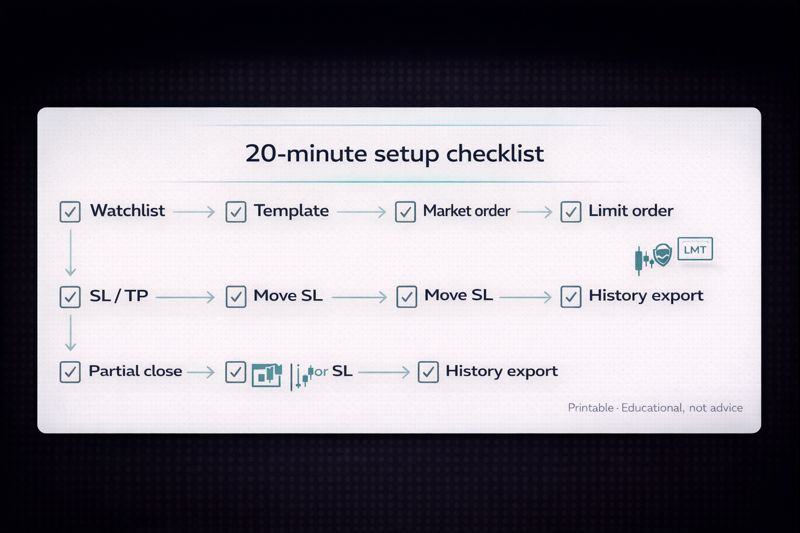
If you want to know whether a platform is truly “good,” don’t read another review. Run this setup once, start to finish.
First, open a demo account and pick one major pair you’ll use as your test instrument. Then build a basic watchlist with majors and one or two additional pairs you might trade later. After that, create a chart template you can reuse, one higher timeframe view for structure and one execution timeframe view for entries.
Next, place one market order and one limit order, and immediately set SL and TP on both. If the platform supports on-chart modification, test that as well by adjusting the SL level and seeing how quickly the change is confirmed. This is where platforms with a clean order panel and on-chart controls often feel dramatically easier.
Finally, close part of a position (if partial closes are available), review the trade history, and confirm you can export or at least clearly read your fills. If a platform makes this painful, journaling becomes painful, and performance improvement slows down.
Common mistakes when choosing a forex trading platform
The most common mistake is picking based on what’s popular instead of what matches your workflow. Popular platforms can be great, but if the interface makes you hesitate or skip stops, it’s the wrong tool for you.
Another mistake is obsessing over spreads and ignoring swaps or commissions. That’s especially costly for swing traders who hold positions overnight, where financing can matter more than the entry spread.
Finally, many traders don’t test the full “account lifecycle.” They test charting, place a demo trade, and decide. A better approach is to test execution, then test support responsiveness, then test a small deposit/withdrawal process (when you’re ready). Platforms are tools; brokers are relationships. You want both to be reliable.
Final take: which platform should you choose?
If you want the simplest path to a strong decision, do this: pick your platform type first (execution-first vs charting-first vs automation-first), then choose a broker that offers it with costs that match your strategy, then validate everything with a short demo test.
For many traders, a modern execution-first workflow is the missing piece. That’s where TradeLocker fits naturally: it’s built around clean charting, quick trade management, and risk clarity. For others, MT5’s ecosystem or TradingView’s charting will be the best starting point, especially if your strategy is more automation- or analysis-heavy.
Whatever you choose, the goal is the same: a platform that makes your best habits easy and your worst habits inconvenient.
