The trading platform you choose isn’t just “where you click buy and sell”.
It defines how easily you can control your risk, and whether you actually follow your plan when price starts moving fast.
MetaTrader (MT4/MT5) is the veteran in this space: a multi-asset platform packed with indicators, custom tools, and a huge ecosystem of Expert Advisors (EAs).
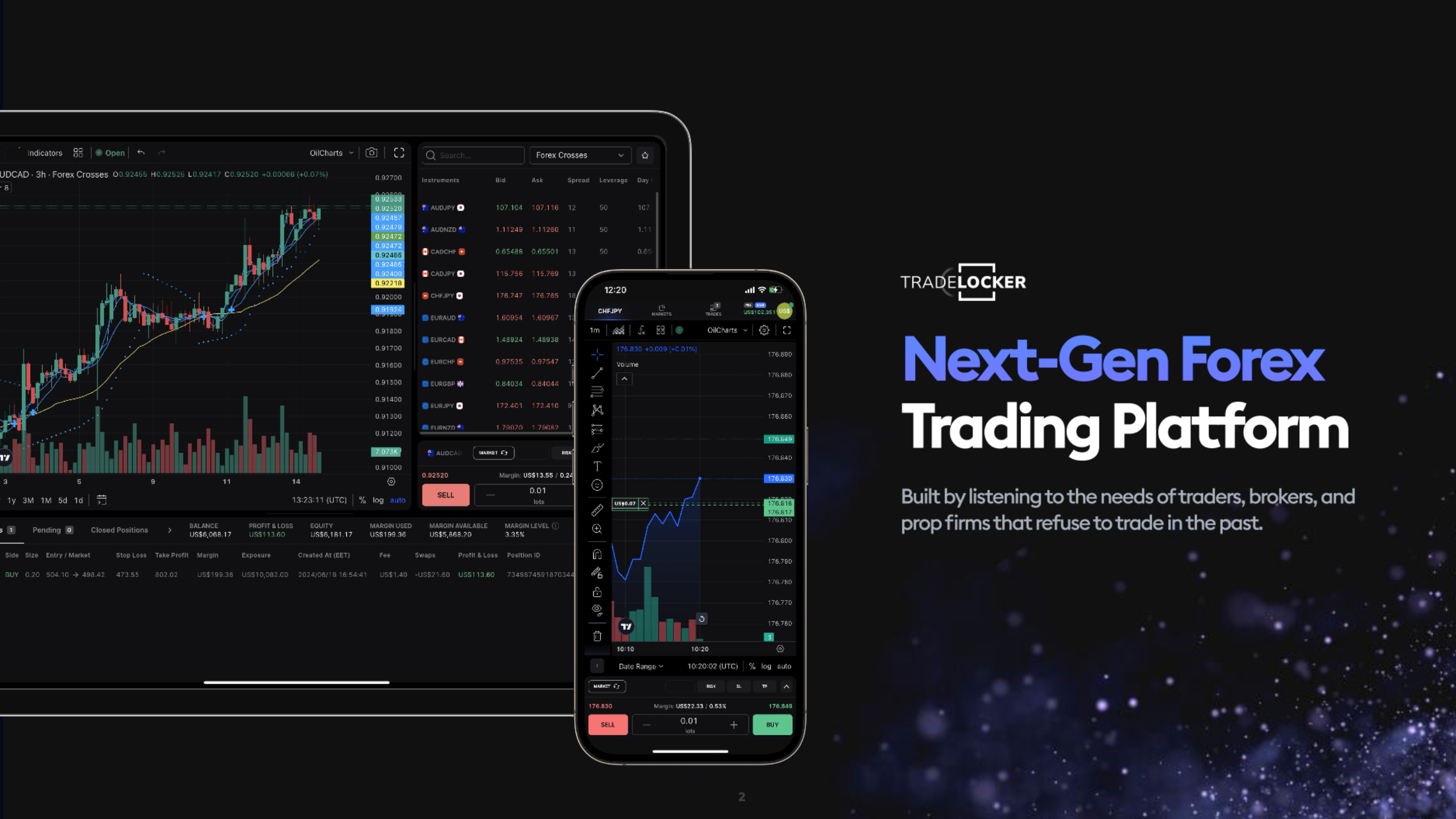
TradeLocker is the newer, TradingView-powered platform designed around how modern day and prop-firm traders actually operate: clean interface, on-chart risk tools, and fast access on web, desktop, and mobile.
In this guide, we’ll compare TradeLocker vs MetaTrader on features, UX, automation, and prop-firm use cases and give you a practical way to decide which one fits your trading style.
TradeLocker vs MetaTrader: Quick Overview
What Each Platform Really Is
MetaTrader (MT4/MT5) – A long-standing multi-asset trading platform used by brokers and prop firms worldwide. It supports forex, indices, stocks, commodities and more, with advanced charting, dozens of indicators, and the ability to run automated trading systems (EAs).
TradeLocker – A newer, execution-focused platform built around TradingView charting. It combines smart risk tools (SL/TP, risk per trade, visual position sizing) with fast web, desktop and mobile access, tailored to how active and prop-firm traders actually trade every day.
The Core 2026 Difference
MetaTrader = automation depth + huge ecosystem + legacy familiarity
- Deep EA and custom indicator library.
- Robust strategy testing.
Available at a massive number of brokers and props.
TradeLocker = TradingView UX + risk tools + modern web/mobile
- TradingView charts integrated into the platform.
Advanced risk tools and on-chart trading. - Built for fast, intuitive manual trading across devices.
Quick Verdict
Pick TradeLocker if:
- You trade mostly manually.
- You prefer TradingView-style charts for your analysis.
- You want clear, visual risk tools that make it easier to stay within prop-firm or personal risk rules.
Stick with MetaTrader if:
- Your edge relies on EAs and custom indicators.
- Your broker or prop firm only supports MT4/MT5.
TABLE 1 – Summary at a Glance
| Platform | Ideal User | Main Strengths |
| TradeLocker | Manual & prop-firm day traders, TradingView fans | TradingView charts, on-chart risk tools, clean UX, strong for challenges & funded accounts |
| MetaTrader | EA/automation traders | Huge EA ecosystem, advanced backtesting |
Why Your Trading Platform Choice Really Matters
Most traders pour hours into strategies, patterns, backtests and then run everything on whatever platform is handed to them.
That’s backwards.
Your platform directly affects:
Risk Management
How quickly and accurately you can set and adjust stop loss and take profit, adjust size positions by fixed amount, percentage of account, or fixed risk per trade. Avoid oversizing and “fat-finger” errors when the market is moving.
Strategy Fit
Different trading styles demand different tools and user experiences:
- Scalping vs intraday vs swing vs long-term.
- Fully automated systems vs manual price-action trading.
- Self-funded vs prop-firm challenges with strict rules.
A scalper trading news spikes needs something very different from a long-term EA trader running strategies on a VPS.
Mental Load
Your platform also shapes how much mental energy you spend on execution vs analysis:
- Are you calmly clicking through a simple, intuitive interface?
- Or are you hunting through menus and panels while your candle closes?
Many funded-trader education programs stress the same point: most accounts fail on risk discipline and execution, not because the strategy is hopeless. When emotions are high, a platform that keeps risk and position sizing clear is a real advantage.
In this article, we’ll compare TradeLocker vs MetaTrader not just on feature lists, but on how they impact your execution, risk discipline, and everyday trading workflow.
Platform Background: What Are MetaTrader and TradeLocker?
MetaTrader (MT4 & MT5) in 2026
MetaTrader has been the go-to platform in the FX/CFD space for years and remains deeply embedded across brokers and prop firms.
MT5, the newer version, is a multi-asset platform that can handle: Forex, Indices, Stocks, Commodities, Other CFDs (depending on broker)
Key pillars of MetaTrader:
- Expert Advisors (EAs) – automated strategies written in MQL4/5 that can run 24/5 on a VPS.
- Strategy testing & optimisation – especially in MT5, where multi-asset and multi-threaded backtesting is possible.
- Huge ecosystem – thousands of paid and free EAs, indicators and utilities,
If you’ve traded with a more traditional FX broker or with many current prop firms, there’s a good chance MetaTrader was the first platform you saw.
TradeLocker: Next-Gen TradingView-Powered Platform
TradeLocker sits in the newer generation of trading platforms built around TradingView charts, simple UX and strong risk tools.
From the way the product is positioned:
- It’s designed as a next-gen day trading platform, shaped by feedback from large numbers of active traders.
- TradingView charting is integrated directly into the UI, so you can analyse and trade without juggling multiple tools.
- The platform focuses strongly on risk management, including SL/TP controls that are easy to set visually, Risk views in currency and percentage.
- It’s built for quick, confident decisions across web, desktop, and mobile, rather than being desktop-only.
Modern comparisons of trading platforms for prop and CFD traders regularly mention TradeLocker alongside MT5, cTrader and Match-Trader as one of the leading options for active traders.

Feature-by-Feature Comparison: TradeLocker vs MetaTrader
Order Types, Execution & Risk Management
MetaTrader (MT4/MT5)
- Supports a range of order types: Market, limit, stop, stop-limit (MT5), hedging and netting modes, depth-of-market on MT5 with compatible brokers. Order placement and management is primarily handled through separate order windows and context menus.
- This approach is powerful, but it can feel more like filling in a form when you’re under time pressure.
TradeLocker
TradeLocker is built around on-chart trading and clear risk visuals:
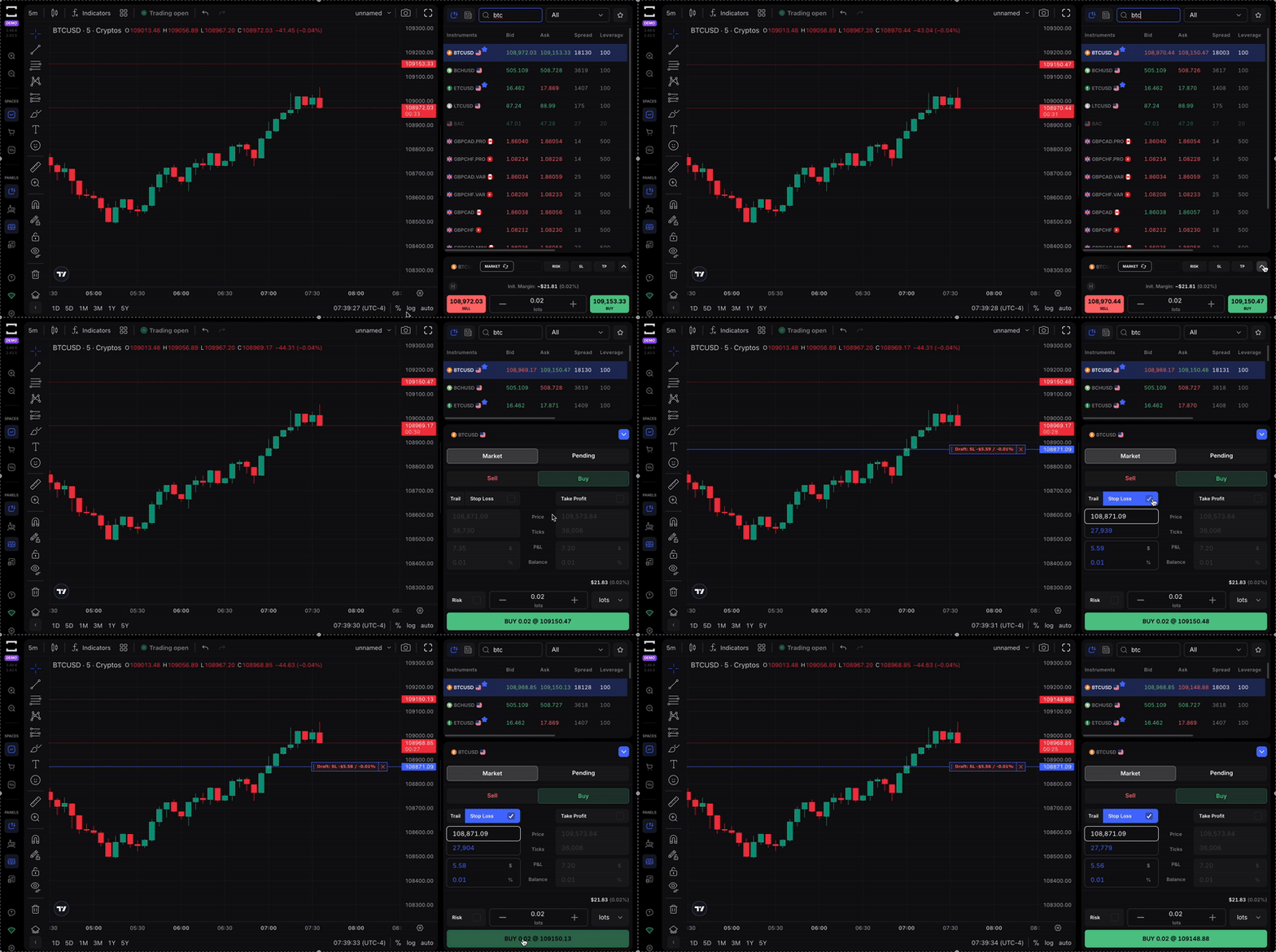
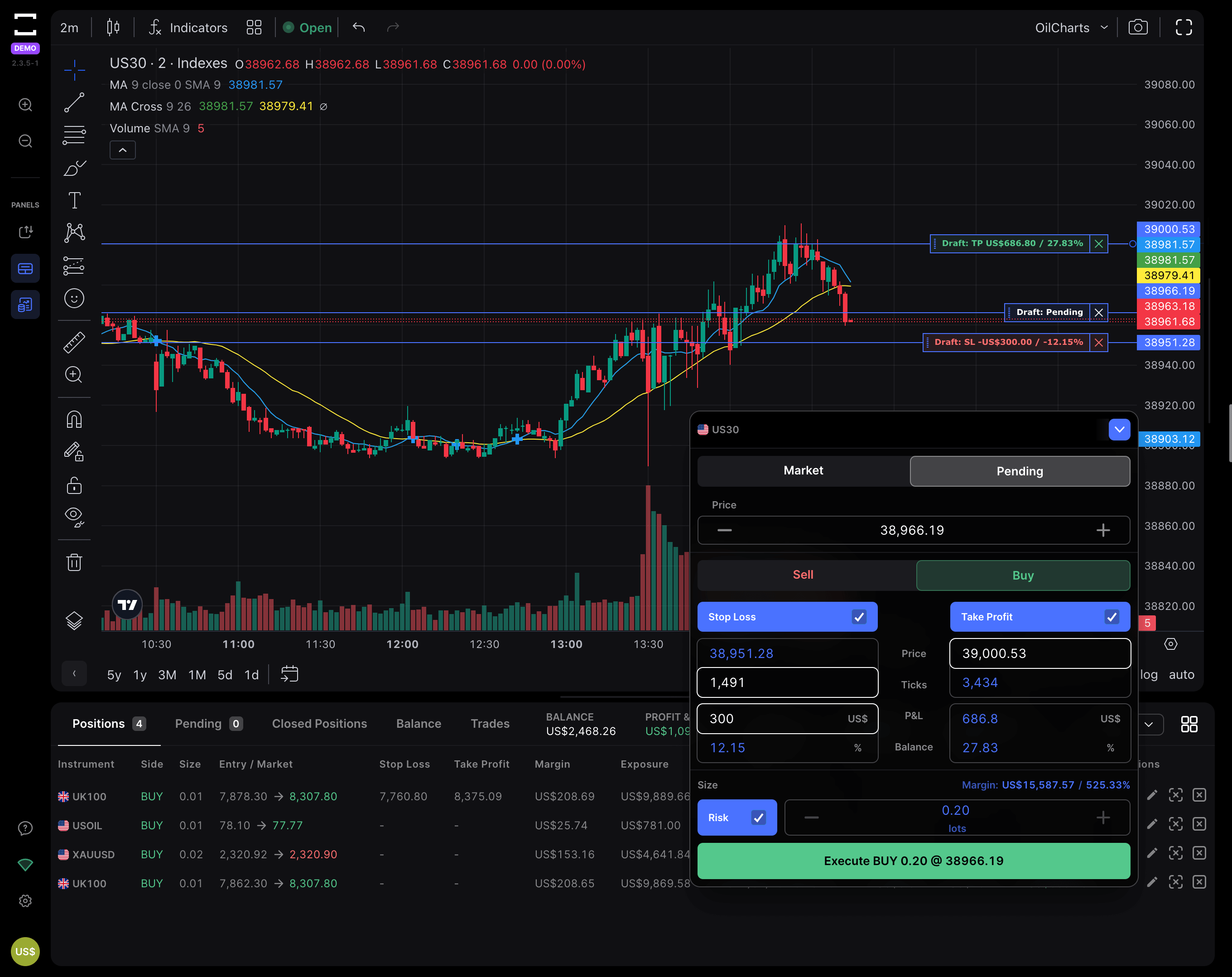
- Place, modify and cancel orders directly from the TradingView chart.
- Drag SL/TP lines on the chart instead of typing precise price levels.
- See your risk per trade in account currency and percentage before you confirm.
- Position size is automatically adjusted based on the stop distance and your predefined risk.
For traders working with strict risk rules, especially in prop-firm challenges, this makes it much easier to stay within limits. TradeLocker’s order panel is designed to help you apply your risk model consistently, rather than trusting yourself to do fast pip math in your head.
Charting & Indicators: MetaTrader vs TradingView Inside TradeLocker
MetaTrader
MT5 provides multiple timeframes (from 1-minute to monthly). It comes with a solid set of built-in indicators and drawing tools, plus support for custom indicators and templates. The charting engine is robust, but the design feels more like a classic desktop platform than a modern web app.
TradeLocker
Uses TradingView charting as the core chart engine.
That means access to:
- A very wide range of indicators.
- Advanced drawing tools.
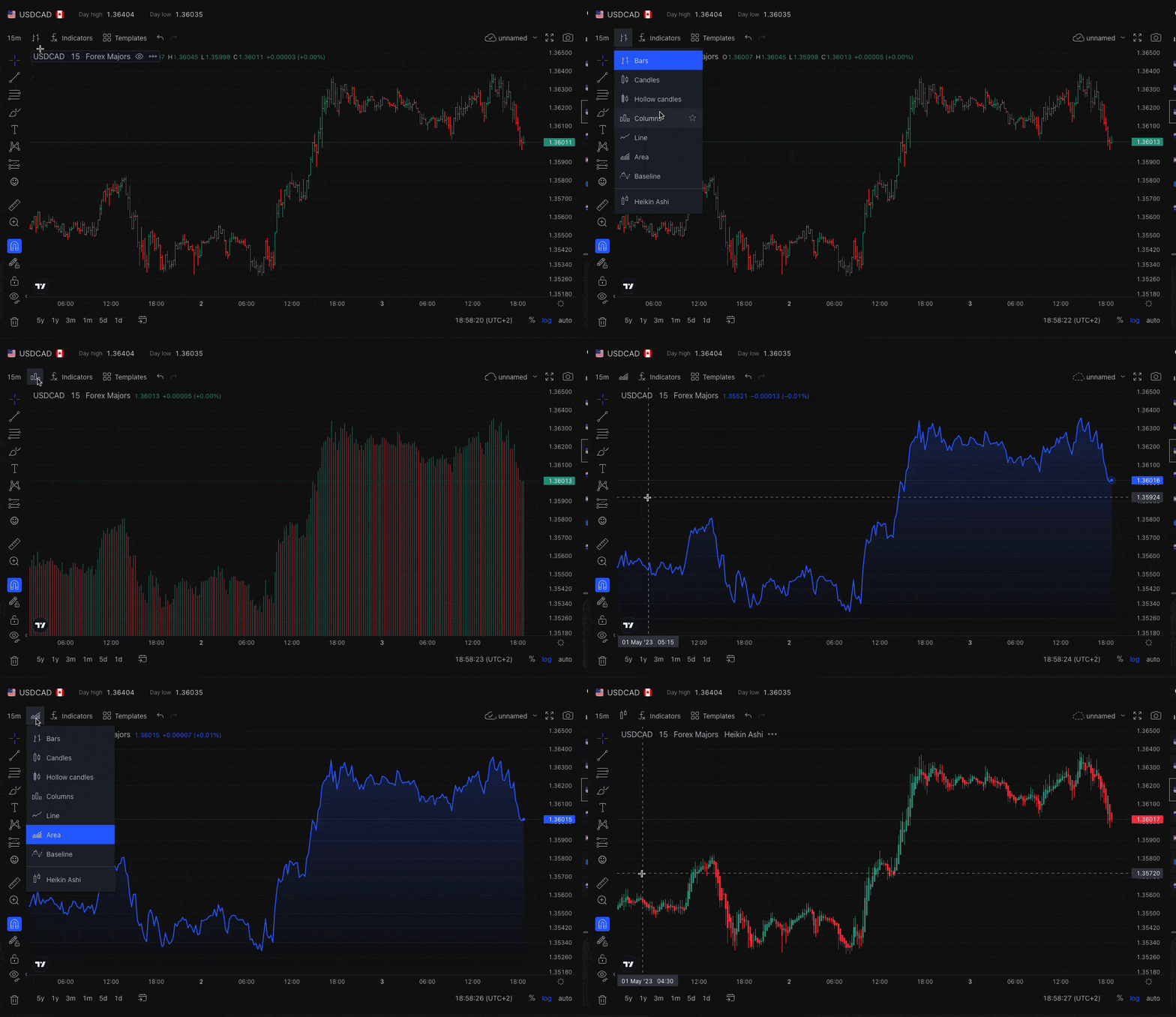
- Flexible layouts and smooth zooming/panning.
For traders who already analyse on TradingView, the environment feels instantly familiar.
If you currently analyse on TradingView and then switch to another platform just to execute, TradeLocker lets you do both in one place, reducing friction and potential transcription errors.
Automation, Copy Trading & Third-Party Tools
MetaTrader
MetaTrader has been the default home for automated trading in the retail world.
EAs (Expert Advisors) are coded in MQL4/5 and can run continuously on a VPS. The strategy tester allows for backtesting and optimisation across many markets and timeframes. There’s a huge marketplace of robots, indicators and utilities, plus signals and copier services.
If your edge is tightly bound to a complex EA portfolio or custom MQL tools, MetaTrader is still the natural base.
TradeLocker
TradeLocker is primarily oriented towards manual and semi-discretionary trading with TradingView charts, but it does more than that.
It works with trade-copier tools that let you route trades between multiple platforms (for example, from MT5 accounts into TradeLocker or vice versa), which is popular among prop traders running several accounts.
It includes TradeLocker Studio, where you can design, test and run your own bots without needing to code in MQL.
A bots Marketplace allows you to discover and deploy pre-built strategies within the TradeLocker environment.
So while MetaTrader still has the deeper, older EA ecosystem, TradeLocker gives you a more visual, accessible way into automation through Studio and the Marketplace, especially if you don’t want to learn how to code.
Asset Coverage & Market Types
One key point: neither platform decides what you can trade. That’s up to the broker or prop firm behind it.
MetaTrader is widely used to offer forex, indices, commodities, stocks and many other CFDs.
TradeLocker is used by providers offering FX, indices, commodities, crypto and similar assets, with the exact list depending on the broker or prop firm
When comparing platforms, make sure you’re also comparing the actual instruments available through the specific broker or prop firm you’re considering.
Broker & Prop-Firm Integration
Across platform comparison content and prop-firm reviews, you see the same pattern:
MetaTrader remains the default at many FX brokers and a large number of prop firms.
TradeLocker is increasingly featured by modern brokers and prop firms that want to offer TradingView charts and a more user-friendly execution environment, often alongside MT5, cTrader and Match-Trader.
TABLE 2 – Feature Checklist
| Feature / Area | TradeLocker | MetaTrader (MT4/MT5) |
| Charting engine | TradingView integrated | Native MT charts |
| On-chart trading | Yes (SL/TP and full-screen + floating order panel.) | Limited (mainly via order windows) |
| Risk calculator | Built-in (risk in $, %, ticks and price, and automatic lot sizing) | Mostly manual (lot + pip math) |
| Automation | TradeLocker Studio & bots Marketplace + backtesting + running bots. | Full EA ecosystem + strategy tester |
| Web platform | Native web app | MT5 Web / broker-specific WebTrader |
| Desktop | Yes | Yes |
| Mobile apps | iOS & Android | iOS & Android |
| Prop-firm penetration | Growing (modern prop firms & brokers) | Very high (legacy and modern prop firms) |
Usability & Design: Desktop, Web and Mobile Experience
MetaTrader
MetaTrader is extremely capable, but clearly desktop-era in its design:
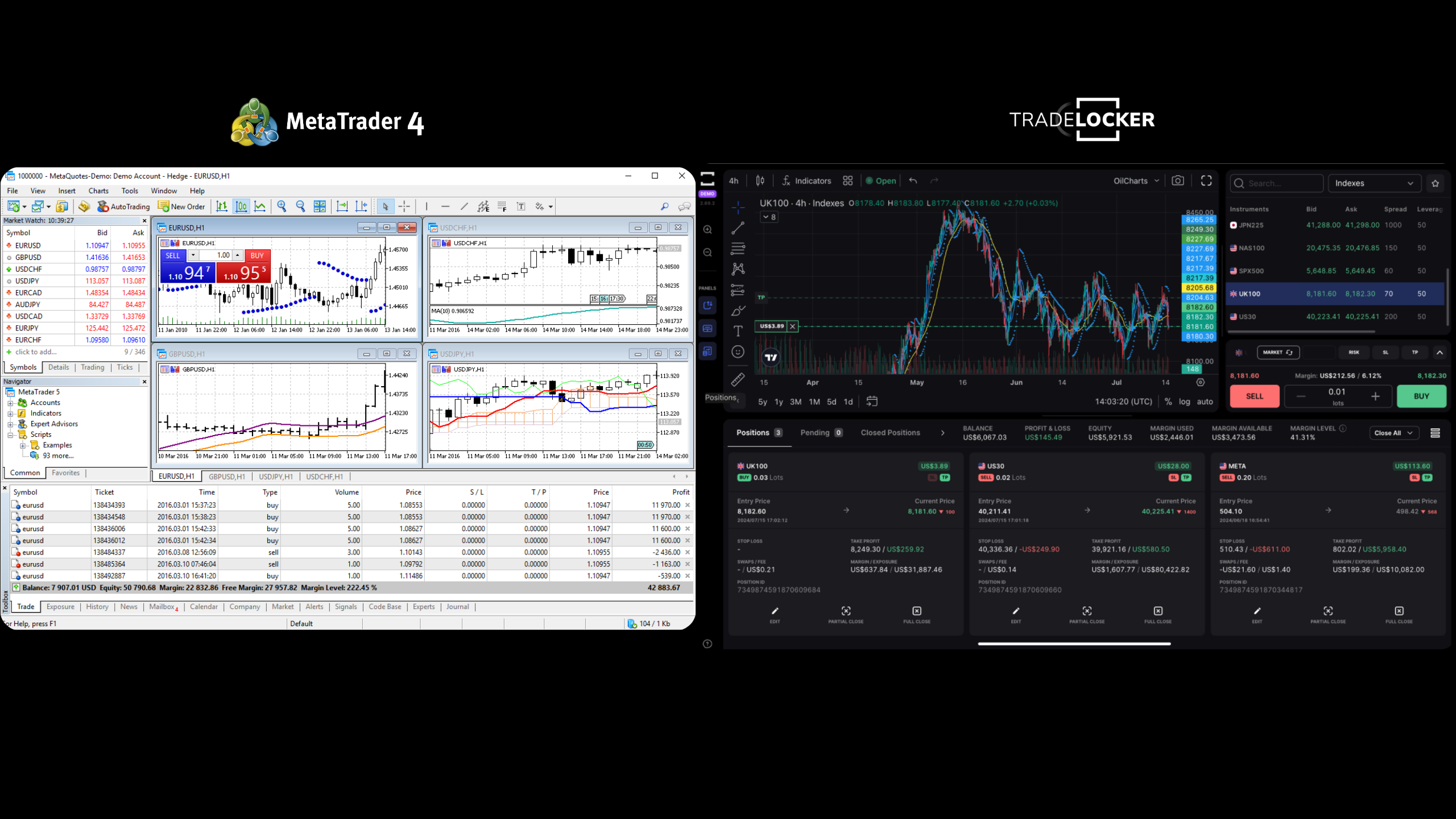
Multi-window “cockpit” layout: market watch, navigator, terminal, multiple chart windows, lots of menus and configuration options.
For experienced traders, this flexibility is powerful. But for newcomers (or busy intraday traders), it can feel visually crowded, easy to mis-click or lose track of which chart you’re actually trading on and it can be slow to set up exactly the way you want.
TradeLocker
TradeLocker takes a modern web-app approach:
Clean, focused layout built around a central TradingView chart. Order panel and risk tools integrated into the same workspace. Minimal clutter and fewer “mystery” windows.
Mobile and desktop experiences are designed to be consistent, so once you understand the layout on one device, it feels familiar everywhere.
Why UX Matters in Real Trading
On paper, both platforms let you open positions, place stops and targets and monitor your PnL.
In practice a cluttered, complex UI increases the odds of wrong lot sizes, SL/TP placement at the wrong level (or forgotten altogether) and a slower reaction in fast markets.
A clean, visual UI makes it easier to see risk and reward at a glance, execute according to your rules, stay calmer during important decisions.
For traders working under strict prop-firm rules, that clarity can be the difference between sticking to a daily loss limit or slipping past it by accident.
Pricing, Accessibility & Where You Actually Pay
The platforms themselves MetaTrader or TradeLocker are not what you pay for directly as a trader.
Instead, your costs typically come from spreads and commissions on your trades (set by the broker or prop firm), swaps/overnight financing where applicable, evaluation and reset fees if you’re trading prop-firm challenges.
MetaTrader
Licensed to a very large number of brokers worldwide. You’ll see MT4/MT5 offered by many FX/CFD providers and a wide variety of prop firms.
TradeLocker
Integrated with a growing set of brokers and prop firms, especially those positioning themselves as modern or trader-first.
When comparing “costs” between TradeLocker and MetaTrader, what you’re really comparing is the brokers and props that support each. Their spreads, commission plans, execution quality and swaps.
TABLE 3 – Broker/Platform Matrix
| Platform | How You Access It | What You Actually Pay For |
| TradeLocker | Via brokers & prop firms that integrate TL | Spreads, commissions, swaps, evaluation/reset fees |
| MetaTrader | Via brokers & prop firms licensing MT4/MT5 | Spreads, commissions, swaps, evaluation/reset fees |
Prop-Firm & Funded-Trader: Why Platform Choice Matters Even More
If you trade prop challenges or funded accounts, your platform choice becomes even more critical.
Most failed challenges don’t fail because the strategy is completely useless, they fail because of oversized positions, emotional, revenge or FOMO clicks, poor execution around news and volatility spikes or ignoring or mis-calculating daily and overall drawdown rules.
Where TradeLocker Often Shines for Prop Traders
TradeLocker’s design leans heavily into risk clarity.
Risk per trade is displayed directly in the ticket. SL/TP levels show expected loss and profit in money and % before you commit. TradingView charts make it easy to read structure and levels quickly. Web and mobile apps share the same logic and layout, so you don’t feel like you’re on a completely different platform when you switch devices.
This combination reduces the friction between “I know my rules” and “I actually followed them on this click.”
Where MetaTrader Still Plays a Big Role
MetaTrader still has important roles in the prop and funded world with running EAs 24/5 on VPS setups and traders who have invested years into MetaTrader-based dashboards, tools and workflows.
For many serious traders, the end result is a mixed stack: keep MetaTrader for long-running automated strategies and infrastructure, and use TradeLocker for hands-on, discretionary trading where UX and risk tools matter most.
Who Is TradeLocker vs MetaTrader Best For?
MetaTrader: Algo Traders & Multi-Broker Power Users
MetaTrader is usually the better choice if your core edge is encoded in EAs and custom indicators and if you regularly use the strategy tester for backtesting and optimisation and you’re comfortable in the MetaTrader environment and rely on the MQL ecosystem.
In other words, if most of your trading brain lives in code, MetaTrader is still a very strong home base.
TradeLocker: Modern Day Traders & Funded Account Traders
TradeLocker tends to be a better fit if you trade manually or semi-discretionary, using price action, levels, and patterns.
If you already analyse charts in TradingView and would like your platform to feel similar. You’re focused on: prop-firm evaluations and funded accounts, or personal accounts with strict risk rules. You want the platform to make position sizing clear and fast and SL/TP management visual and intuitive.
TradeLocker is commonly praised for its modern feel, intuitive design and suitability for active, risk-aware traders.
Hybrid Approach: When to Use Both
Many experienced traders end up using both platforms:
MetaTrader (usually MT5) for automated portfolios and longer-term EAs and Backtesting and strategy development.
TradeLocker for discretionary intraday trading and prop-firm challenges and funded accounts where execution quality and risk presentation are crucial.
This way, you’re not forcing all your trading into one model, you’re using each platform where it’s strongest.
TABLE 4 – Persona-Based Recommendations
| Trader Type | Recommended Platform Setup |
| Discretionary day trader (retail) | TradeLocker as primary |
| Full-time EA / automation trader | MetaTrader as primary |
| Prop-firm / funded-account trader | TradeLocker as primary, MT if prop requires it |
| Mixed: EAs + manual intraday | MT5 for EAs + TradeLocker for manual trades |
Pros and Cons of TradeLocker vs MetaTrader
TradeLocker: Pros & Cons
Pros
- Native TradingView charts inside the platform.
- Clean, modern UX designed around fast, manual execution.
- On-chart trading and risk tools that let you see SL/TP and risk per trade at a glance.
- Web, desktop and mobile apps with a consistent layout.
- Very strong fit for modern day traders, especially in prop and funded contexts.
- Access to TradeLocker Studio and the bots Marketplace for a more visual, no-code route into automation.
Cons
- Smaller EA and custom indicator ecosystem compared to MetaTrader’s long history.
- Overall experience depends on how well each broker or prop implements and supports TradeLocker.
MetaTrader: Pros & Cons
Pros
- Very large and mature EA and indicator ecosystem.
- Powerful backtesting and optimisation tools, particularly in MT5.
Broad multi-asset support and broker integration. - Widely known
Cons
- Interface feels more dated and cluttered compared to modern web-first platforms.
- Steeper learning curve for new users; a lot of time is spent customising windows and layouts.
- Many traders end up using one tool for analysis (e.g., TradingView) and MetaTrader only for execution, which adds extra steps and room for error.
TABLE 5 – Pros & Cons Side by Side
| Platform | Pros (Short) | Cons (Short) |
| TradeLocker | TradingView charts, modern UX, built-in risk tools, prop-friendly, Studio & bots | Smaller bots ecosystem, broker-dependent experience |
| MetaTrader | Massive EA ecosystem, strong backtesting, multi-asset support | Dated UI, steeper learning curve, separate from TradingView |
TradeLocker vs MetaTrader: Side-by-Side Comparison Table
If you’re skimming, this is your quick snapshot.
TABLE 6 – Full Comparison
| Feature / Area | TradeLocker | MetaTrader 5 |
| Charting engine | TradingView integrated | Native MT5 charts |
| Built-in indicators | TradingView indicator library (hundreds) | Dozens + custom indicators |
| On-chart order editing | Yes (drag lines, visual SL/TP & entries) | Limited |
| Risk calculator | Yes – risk %, currency, auto-lot sizing | Mostly manual |
| Automation |
TradeLocker Studio + bots Marketplace |
EAs in MQL5, more advanced testing |
| Backtesting | Via Studio tools & integrations | Advanced, multi-asset, multi-thread |
| Web platform | Native web app | MT5 Web / broker web platforms |
| Desktop | Yes | Yes |
| Mobile | iOS & Android apps | iOS & Android apps |
| Typical use | Manual/prop day trading + visual automation | Multi-asset, EA + manual trading |
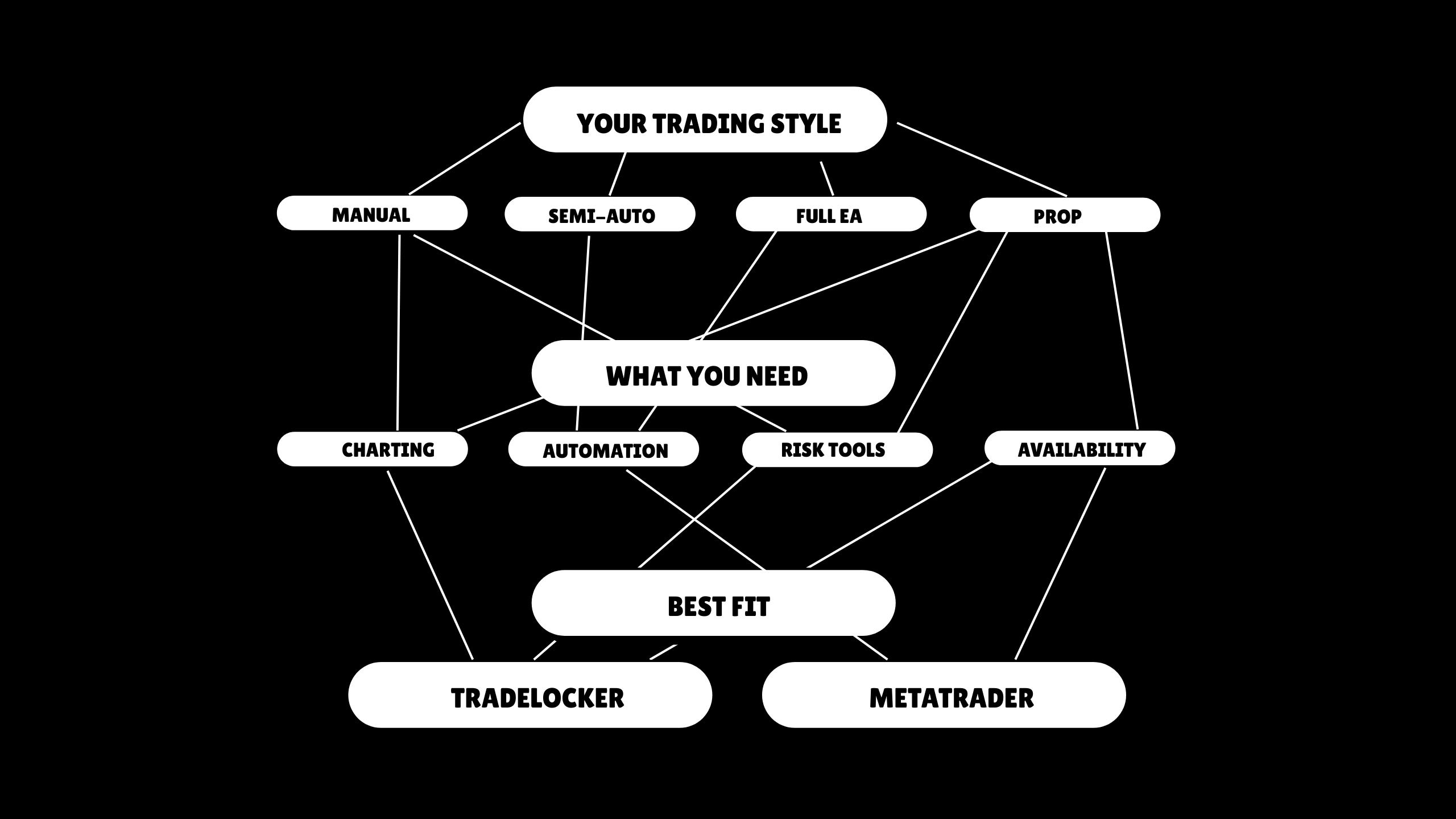
How to Choose (and When to Switch) Between TradeLocker and MetaTrader
Here’s a simple 4-step process you can actually use.
1. Clarify Your Trading Style
Be honest about what you actually do scalping / intraday / swing / position. Entirely manual, fully automated, or a mix. Self-funded only vs heavy focus on prop-firm evaluations.
2. Rank What Matters Most
Rank these from 1 (most important) to 4 (least):
- Automation & backtesting (EAs, strategy testers).
- Charting experience & tools (TradingView vs MT).
- Risk tools & execution UX (on-chart SL/TP, risk %).
- Availability with trusted brokers/props.
As a rough rule:
If charting + risk tools are #1 → you lean TradeLocker.
if automation and backtesting are #1 → you lean MetaTrader.
3. Check the Brokers/Props You Actually Trust
Now add real-world constraints: which regulated brokers and reputable prop firms do you trust? What platforms do they offer? How do they score on spreads, execution, and uptime in your trading session?
Your ideal setup sits at the intersection of your needs and what good providers actually support.
4. Test Both on Demo
Finally, run your own A/B test. Open demo accounts on: A broker/prop offering TradeLocker, a broker/prop offering MetaTrader.
Trade both for a set number of trades (e.g., 50–100), or a fixed time (e.g., a few weeks).
Then you should track: time from idea to order, number of execution mistakes (wrong lot, missing SL, wrong SL/TP), how calm or stressed you feel when using each.
If you consistently make fewer mistakes and feel more in control on one platform, that’s probably the better choice for your main manual trading.
5. When Switching Makes Sense
A common path looks like this:
Keep MT5 for long-term EAs, strategies already built in MQL and add TradeLocker for manual day trades, prop-firm challenges and funded accounts where UX and risk tools give you an edge.
If over time you realise you’re more consistent on TradeLocker, your execution is cleaner and your drawdowns are more controlled then it makes sense to treat TradeLocker as your primary execution platform for manual trading, while still using MetaTrader or TradeLocker Studio bots for automation.

FAQ
Which is better overall, TradeLocker or MetaTrader?
It depends on where your edge comes from.
TradeLocker is usually the better fit if you’re a manual day trader, you trade prop-firm accounts or challenges or you already think in TradingView charts and want risk tools built into the same interface.
MetaTrader is usually the better fit if you’re an EA/automation trader, you rely on MQL-based tools and the MetaTrader ecosystem.
Is TradeLocker reliable?
Short answer: yes.
TradeLocker is built as a modern, multi-device platform with TradingView charts and risk-focused tools.
Like any platform, the real-world reliability also depends on the broker or prop firm’s servers and infrastructure, your connection quality, device, and setup.
It’s always worth checking actual user feedback for the specific combination of provider + TradeLocker you plan to use.
Can I use TradeLocker “inside” MetaTrader?
No. TradeLocker and MetaTrader are independent platforms with different technologies behind them.
You can see both platforms with the same broker/prop (if they support both) or use trade copiers to sync trades between accounts.
But one platform doesn’t “run inside” the other.
Does TradeLocker charge a fee?
No. You don’t pay a subscription fee for TradeLocker itself as a trader. But you pay spreads, commissions and swaps via your broker or evaluation and reset fees via your prop firm.
Always check the fee structure of the specific provider you’re using.
Does TradeLocker use TradingView?
Yes. TradeLocker integrates TradingView charting directly into the platform, so you can use familiar tools and layouts without needing a separate TradingView tab or connection just to chart.
What app is better than MetaTrader 5?
It depends on what “better” means to you:
If you value EAs, in-depth backtesting, and a massive automation ecosystem, MT5 is still extremely strong.
If you care more about TradingView charts, intuitive UX, and on-chart risk tools, TradeLocker can offer a smoother everyday experience especially if you’re trading manually or managing prop-firm accounts.
Which brokers and prop firms use TradeLocker?
TradeLocker is used by a growing list of brokers and prop firms around the world.
The easiest way to see who supports TradeLocker is via the TradeLocker Hub.
The Hub is a central directory of partners that use the platform. Inside the Hub, you can see all available brokers and prop firms that offer TradeLocker, compare key details and click through to their sign-up or information pages.For retail accounts, use the brokers section to find a provider and open a TradeLocker connected account. You can also take advantage of filters such as available discounts on prop-firm challenges to quickly spot offers that might be relevant to you.
This means you don’t have to patch together information from scattered reviews. You can start with TradeLocker Hub, then do deeper due diligence on the specific brokers and prop firms that suit your region, style and account size.
TradeLocker vs MetaTrader: Quick Recap
In 2026:
MetaTrader (MT4/MT5) is still a major name in trading automation multi-asset coverage across many brokers, a deep EA ecosystem built in MQL, strong backtesting and more institutional-style features.
On the other side, TradeLocker has become the go-to execution and automation hub for many active traders withTradingView charts built in, so analysis and execution live in one place. It’s clean, modern web/desktop/mobile experience that’s easy to use every day.TradeLocker offers on-chart risk management tools designed around how day traders and funded traders actually manage risk and TradeLocker Studio for building, testing and running your own bots without writing code, plus a bots Marketplace where you can browse and deploy ready-made strategies.
As a simple rule of thumb:
- Choose TradeLocker if you’re a trader who wants TradingView charts, on-chart risk tools, and the option to grow into Studio bots and the Marketplace without touching MQL.
- Choose MetaTrader if you’re an EA-first user and your edge is tightly tied to the traditional MQL EA ecosystem.
The best way to decide?
Run them side by side on demo for a few weeks, track your mistakes and mental load, and commit to the platform that makes it easiest to follow your plan and respect your risk.
In practice, many manual and prop-firm traders end up using TradeLocker for day-to-day execution, while keeping MetaTrader or TradeLocker Studio bots as part of their wider automation stack.