If you trade FX or CFDs, there’s a good chance your first platform was MetaTrader.
MT4 and MT5 are still huge. But the world around them has changed: white-label licenses are tighter, Apple temporarily removed the apps from the App Store before bringing them back, and traders now expect clean, web-first interfaces instead of mid-2000s terminals.
So if you’re searching for MetaTrader alternatives, you’re probably in one of three camps:
- You’re a trader who’s tired of clunky UX, weird Mac workarounds or limited backtesting.
- You’re a prop firm that needs better risk tools and a platform stack that doesn’t rely on a single vendor.
- You’re a broker that wants to get off the MetaTrader treadmill and actually differentiate your brand.
Best MetaTrader Alternatives in 2026 (TL;DR)
Here’s the short version.
These are the most common MetaTrader alternatives you’ll see across trader blogs, broker guides and B2B comparisons — plus how they stack up and where TradeLocker sits in that mix.
| Platform | Best For (Traders) | Best For (Props/Brokers) | Key Strengths vs MetaTrader | Key Trade-Offs |
|---|---|---|---|---|
| TradeLocker | Day & prop traders who want TradingView charts + built-in risk tools | Props & brokers wanting modern, trader-loved UX as a MetaTrader alternative | Native TradingView charts, modern UI, integrated risk calculator | Newer vs legacy platforms; algo tooling still growing |
| cTrader | Serious FX traders, scalpers, algo devs | ECN-focused brokers & props | ECN focus, cAlgo (C#), depth of market, modern interface | FX/CFD-focused, more technical for casual users |
| TradingView | Multi-asset charting, social trading, Pine Script strategies | Brokers embedding TradingView charts as a front-end | Best-in-class charts, huge community, browser-first | Not a broker; needs integrations |
| NinjaTrader | Futures traders & power users | Niche for futures-focused brokers | Advanced charting, backtesting, automation | Desktop-heavy, futures-centric |
| Thinkorswim | US stock & options traders who want research-heavy platform | US-focused brokerage environment | Elite research tools, options analytics | US-centric, not a turnkey FX/CFD broker front-end |
| Match-Trader | Traders wanting modern multi-asset platform with social features | Brokers/props needing all-in-one: platform + CRM + risk + payments | All-in-one B2B stack, social/copy, web & mobile-first | Can feel busy; more infra-focused vs UX-first |
| ProRealTime | Systematic traders needing advanced backtesting & data | Brokers offering ProRealTime connectivity | Powerful backtesting, high-quality data | Not always primary execution platform |
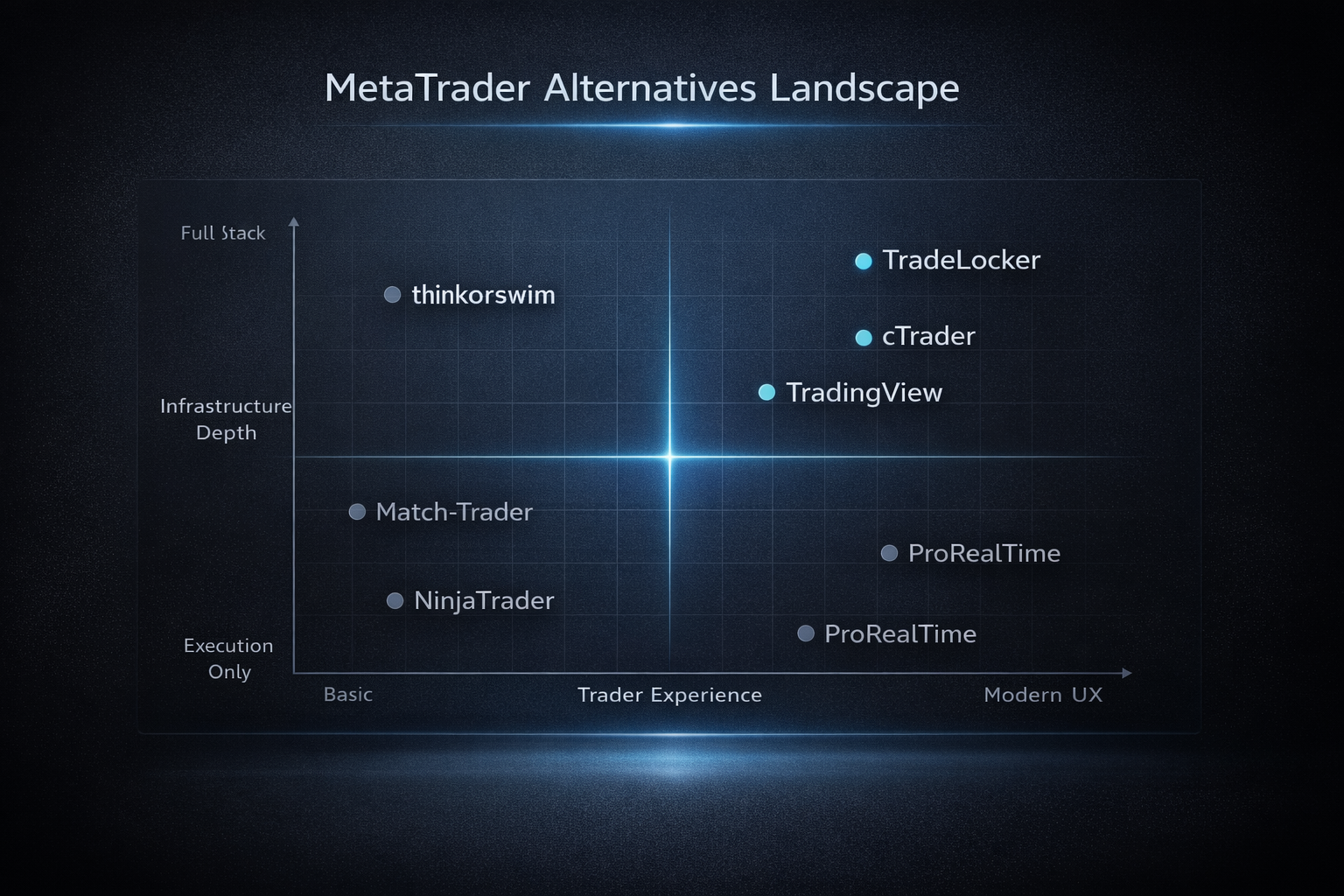
If you just want one starting point: TradeLocker is usually the easiest “first alternative” to try for most FX/CFD and prop traders — then you layer in more niche tools (TradingView, ProRealTime, NinjaTrader) if and when your strategy needs them.
Why Traders and Brokers Are Looking Beyond MetaTrader
Let’s get one thing straight: MetaTrader isn’t going away tomorrow.
But more and more traders, prop firms and brokers are moving from “MetaTrader-only” to “MetaTrader and…” or even “…instead of MetaTrader”.
Here’s why.
1. Pain Points for Traders
If you’re an active trader, you’ve probably hit at least one of these:
- Dated UX and workflow
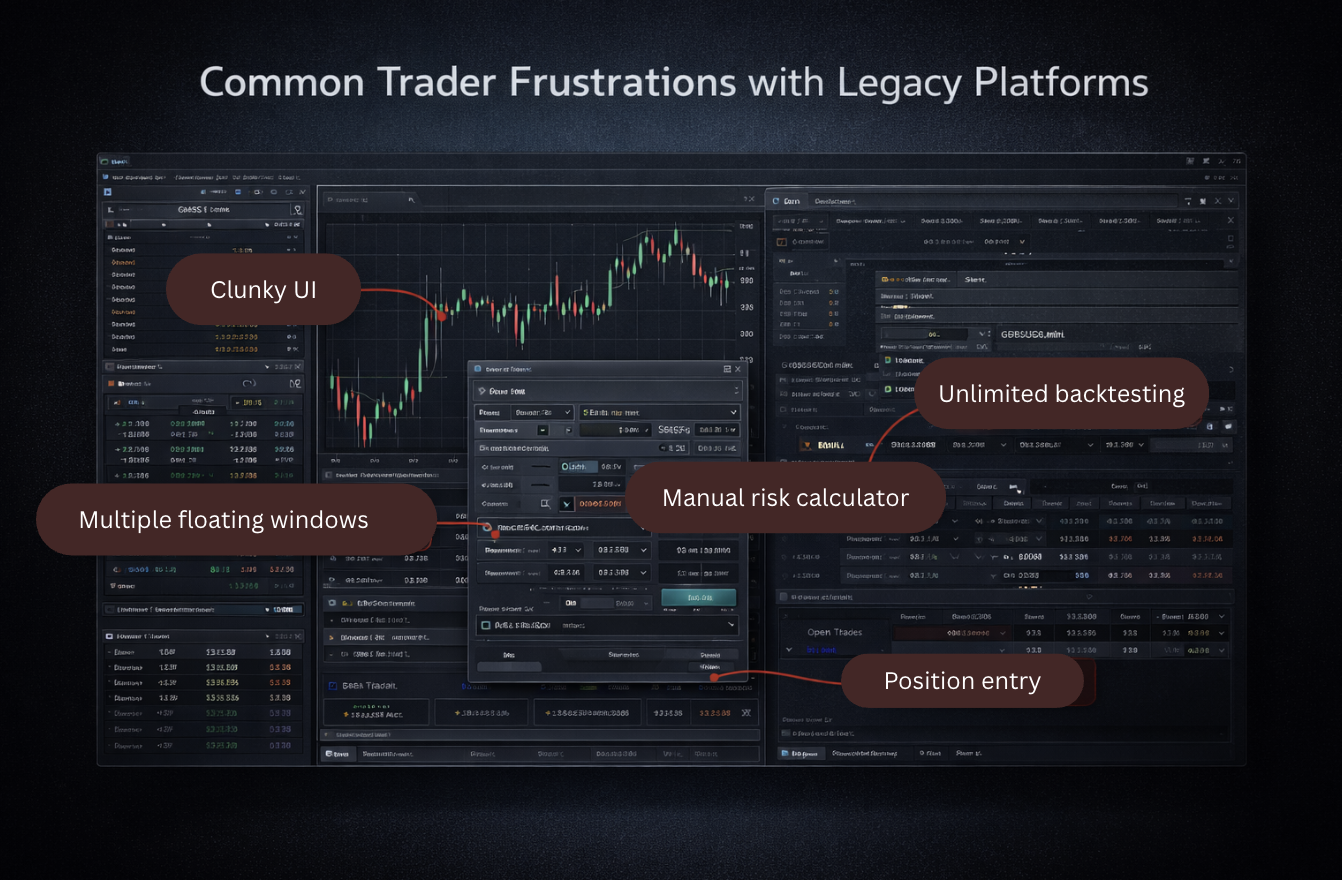
The core MetaTrader interface hasn’t changed much in years. Windows, sub-windows, tiny icons, clunky order tickets. After using a modern, web-first platform, going back to MT4 feels like switching from a smartphone to a flip phone. - Mac and device headaches
Historically, running MetaTrader on Mac has meant emulators, wrappers, or “unofficial” builds. Some brokers have improved things, but it still isn’t a native, first-class Mac / browser experience in the way many newer platforms are. - Backtesting limitations
If you’re into systematic trading, MetaTrader’s Strategy Tester can feel clunky:- single-threaded behaviour on older MT4 setups,
- limited multi-timeframe testing,
- data quality issues unless you import and manage your own history.
- Niche scripting & automation
MQL4 and MQL5 are powerful, but they’re niche languages. If you’re used to Python, C# or JS, the learning curve is steep, and code reuse is limited.
In short: MetaTrader still works, but you often feel like you’re working around it — especially when you compare it to platforms built in the last decade.
2. Pain Points for Brokers & Prop Firms
For brokers and prop firms, the story is different but just as urgent.
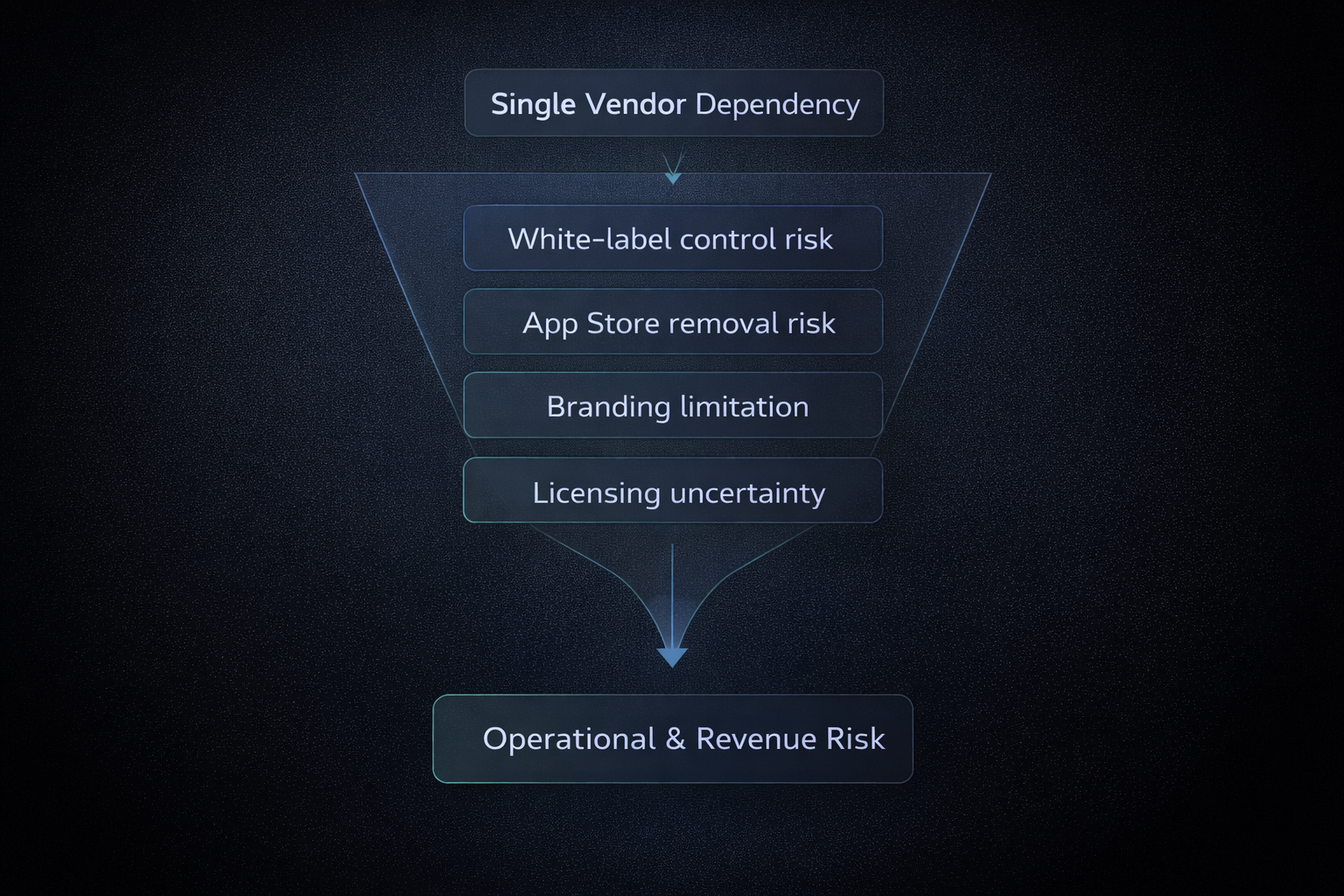
- White-label uncertainty & tighter controls
MetaQuotes has restricted MT4 server licenses and tightened requirements for MT5 white labels. Newer brokers and props have fewer options, more hoops to jump through, and more risk if rules change again. - Apple App Store drama = key-man risk
In 2022, Apple suddenly removed MetaTrader from the App Store, breaking mobile access for a massive chunk of traders overnight. The apps did come back later — but the message was clear: rely on a single vendor for your main platform, and you’re one policy decision away from an emergency. - Zero brand differentiation
If your flagship platform is MT4/MT5, your broker or prop firm looks and feels the same as everyone else’s. Slapping a logo on a decades-old UI only goes so far. It’s hard to build a brand when your main touchpoint is identical to your competitors’. - Modern trader expectations
Traders expect:- clean, mobile-ready UX,
- social/community elements,
- modern charting (think TradingView),
- web-first, multi-device access.
MetaTrader can be part of that world, but it wasn’t designed for it. That’s why many firms add a platform like TradeLocker on top of, or instead of, MetaTrader: to actually meet 2026 expectations.
MetaTrader alternatives list:
1. TradeLocker – Modern, TradingView-Powered Alternative (Our Recommended Starting Point)
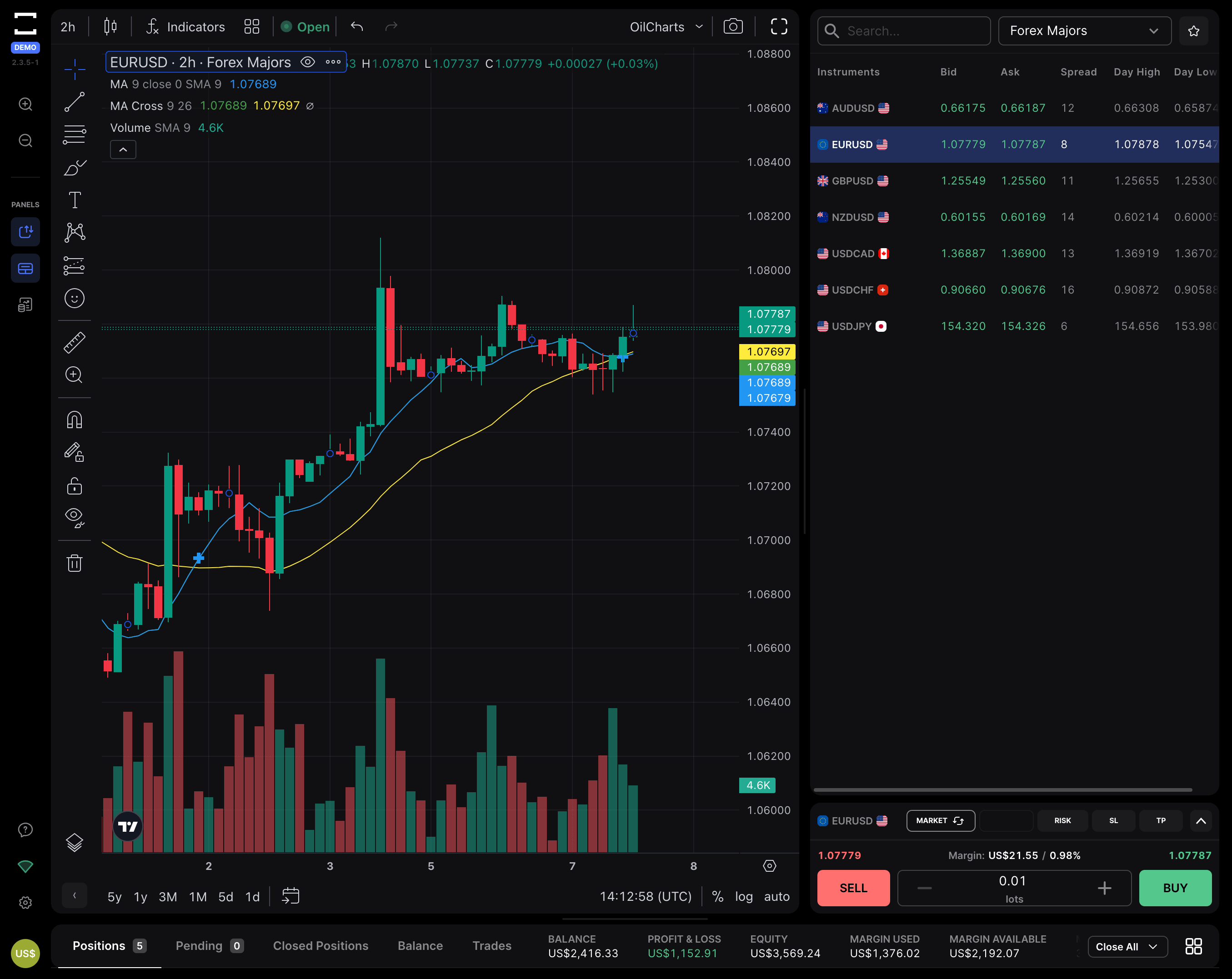
Let’s start with the platform that, for many traders and firms, makes MetaTrader feel genuinely optional rather than mandatory.
What Is TradeLocker?
TradeLocker is a modern trading platform built around a simple idea:
“Give traders the TradingView-style charts and risk tools they already love, inside a clean, fast platform that’s actually enjoyable to use daily.”
Think:
- Native TradingView charting inside the platform (no bridges, no external windows).
- A clean, intuitive interface that feels like a modern web app.
- Built for prop firms and brokers, with multi-device support and risk-aware workflows.
You can use TradeLocker via brokers and props that support it, on:
From a trader’s perspective, it feels like what MetaTrader would look like if it were designed from scratch today.
Key Features vs MetaTrader
Here’s where TradeLocker really separates itself from MT4/MT5:
- TradingView-powered charts baked in
You get the full TradingView-style charting experience inside TradeLocker:- hundreds of indicators,
- familiar drawing tools,
- clean visuals and smooth zooming/panning.
That eliminates the common “TradingView for analysis / MetaTrader for execution” split and keeps you in one environment.
- Modern, minimal UI
TradeLocker has:- a clean layout with clear panels,
- no floating window chaos,
- obvious, labelled controls.
If you’ve ever had to explain MetaTrader to a new trader and watched their eyes glaze over, you’ll feel the difference immediately.
- Built-in risk calculator (prop-friendly)
Instead of doing math in your head or in a spreadsheet, you can:For funded traders and those under strict drawdown rules, this is huge: it makes following your rules the default, not an afterthought.
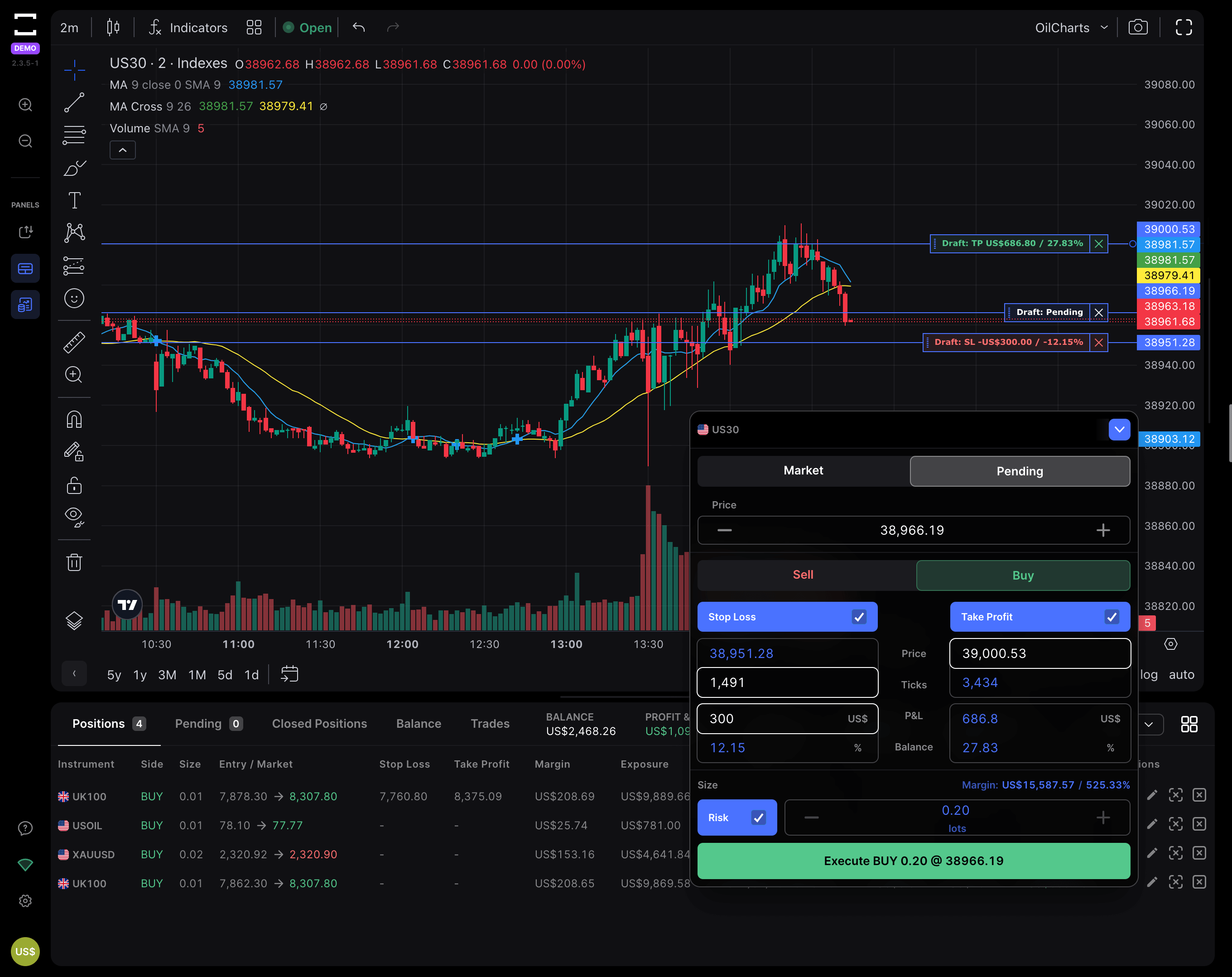
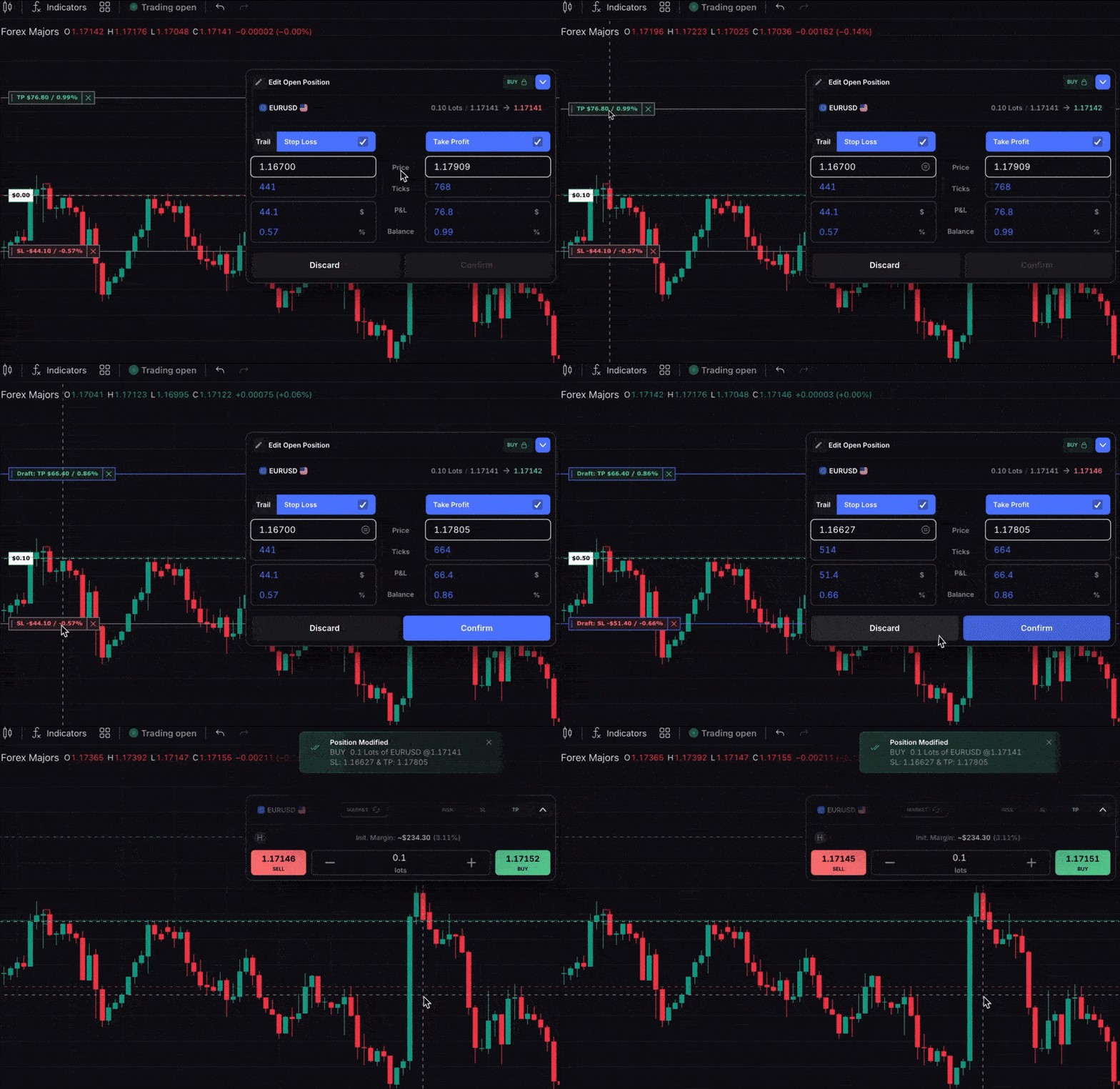
- On-chart trading & trailing stops
Place, drag and modify SL/TP straight on the chart. Turn on trailing stops to protect profits as price moves in your favour, without manually nudging stops every few minutes.
- Multi-device, web-first experience
TradeLocker is designed for web and mobile from day one:- log in on desktop,
- monitor or manage trades from mobile,
- same UX logic across devices.
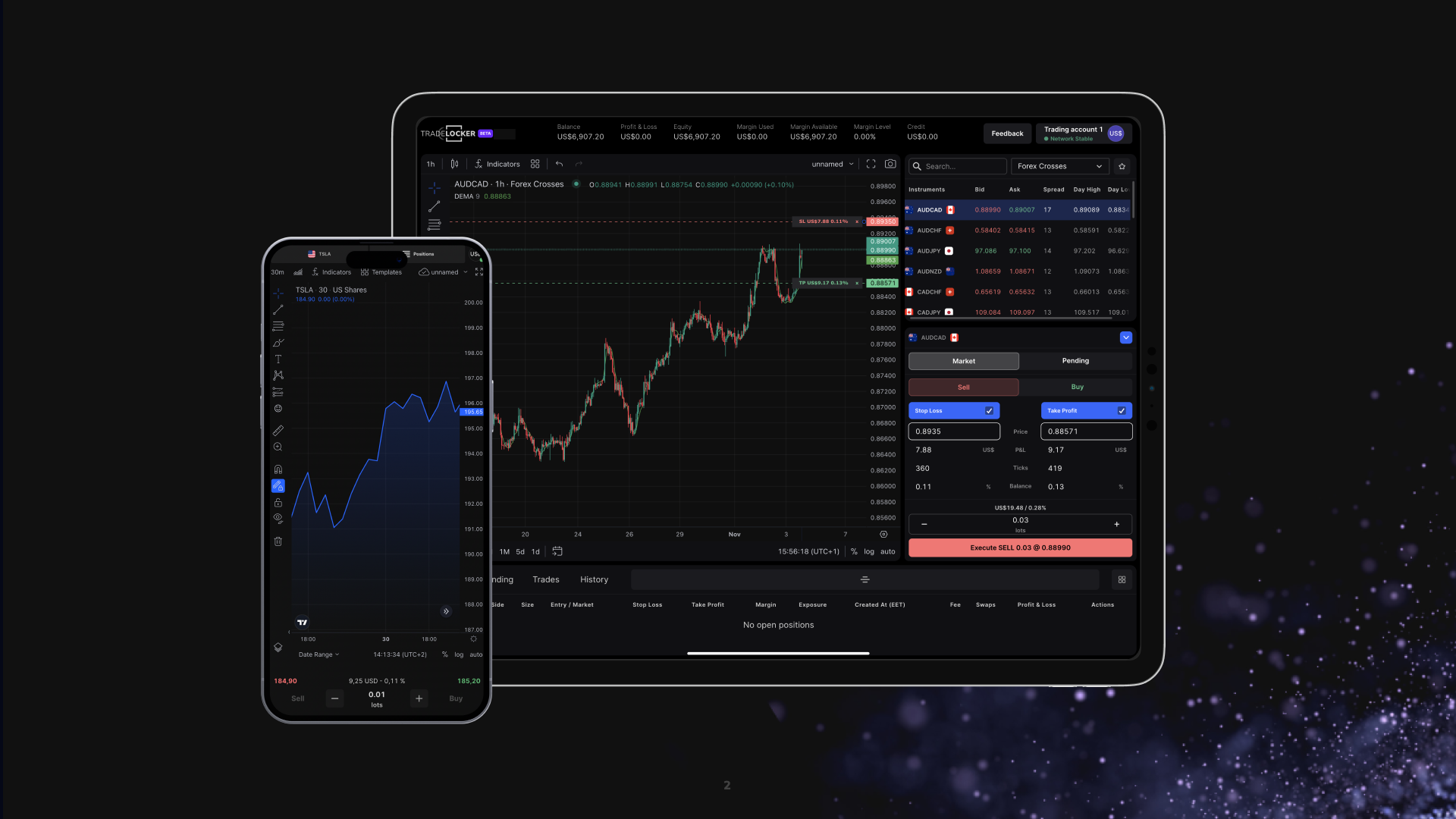
With MetaTrader, you can achieve bits of this — but usually with plugins, external charting, and a lot more friction.
Pros & Cons (with a slight reality check)
Pros for traders
- Familiar if you’ve used TradingView.
- Lower cognitive load vs MetaTrader — especially for newer traders.
- Risk tools that make prop rules easier to follow.
- Less UI clutter = fewer “fat finger” mistakes.
Pros for prop firms & brokers
- A platform that actually looks different from MetaTrader and signals “we’re a modern firm”.
- Very attractive to younger, mobile-native traders.
- Works well alongside MetaTrader in a multi-platform offering.
Cons (honest version)
- It’s newer than MetaTrader and cTrader, so:
- some traders will default to “I trust what I know”,
- the third-party automation ecosystem doesn’t yet match MQL’s long head start.
But for many discretionary traders, especially funded and intraday traders, those trade-offs are outweighed by the day-to-day comfort and control they gain.
Who Should Choose TradeLocker First?
In practice, TradeLocker is often the default first MetaTrader alternative to test if:
- You’re a trader who:
- lives on charts and wants TradingView-like visuals,
- cares about accurate, easy risk sizing,
- wants a platform that doesn’t feel like work to use.
- You’re a prop firm that:
- wants a hero platform you can put front and centre in your marketing,
- cares about trader retention and experience,
- doesn’t want to be 100% at the mercy of MetaQuotes.
- You’re a broker that:
- needs a credible alternative for new clients,
- wants to escape the “just another MT broker” perception,
- is building for the next decade, not the last one.
You can still keep MetaTrader in your stack — but TradeLocker can be the platform you actively guide people towards.
2. cTrader – ECN-Focused Alternative for Serious FX Traders
If your trading style leans toward ECN, depth-of-market and algos, cTrader will almost always be on your radar.
What Is cTrader?
cTrader is a professional trading platform built around:
- ECN connectivity and depth-of-market,
- advanced charting,
- and a strong ecosystem for algorithmic trading via cTrader Automate (cAlgo) in C#.
It’s available on desktop, web and mobile, and is widely adopted by FX and CFD brokers.
Key Features vs MetaTrader
- ECN & depth-of-market focus
cTrader is designed with ECN/STP brokers in mind. You get:- depth of market (DOM),
- tick charts,
- Level II pricing.
- Modern interface
The UI is more modern and polished than MetaTrader’s:- better chart layout options,
- intuitive workspace management,
- streamlined order tickets.
- cTrader Automate (cAlgo)
Uses C# instead of MQL:- easier for developers from a .NET background,
- powerful backtesting environment,
- strong support for algorithmic strategies.
Where cTrader Sits Next to TradeLocker
- If you’re a discretionary chart trader focused on prop-style rule adherence and visual clarity, TradeLocker’s TradingView integration and risk tools often feel more natural.
- If you’re an ECN scalper / algo dev, cTrader can be a very strong complement:
- discretionary trading on TradeLocker,
- automation and ECN-focused strategies on cTrader.
Best For
- Traders
- advanced FX traders,
- scalpers,
- algorithmic traders who want C#.
- Props/Brokers
- ECN-first brokers,
- props with a lot of advanced FX traders,
- firms that want a more “pro FX” flavour alongside TradeLocker.
3. TradingView – Charting & Community First, Execution Second
TradingView isn’t a broker and isn’t always your main execution venue — but it’s often the first “escape hatch” from MetaTrader’s charts.
What Is TradingView?
TradingView is a web-based charting platform and social network for traders:
- browser-first, works on almost anything,
- multi-asset coverage (FX, stocks, crypto, indices, futures),
- Pine Script for custom indicators and strategies,
- huge community sharing ideas and code.
Many brokers also embed TradingView charts directly in their platforms or websites.
Strengths vs MetaTrader
- Best-in-class charting
Clean, crisp charts with:- a massive indicator library,
- intuitive drawing tools,
- multi-chart layouts that are easy to set up.
- Community & ideas
You can:- browse public trade ideas,
- follow favourite authors,
- clone and adapt community scripts.
- Pine Script
A scripting language that many traders find easier to learn than MQL, especially for indicator and strategy prototyping. - Broker integrations
Many brokers let you connect accounts to TradingView and trade directly from the charts.
How It Works With TradeLocker
A common pattern for modern traders:
- Use TradingView (or TradingView-like tools) for:
- multi-timeframe analysis,
- idea generation,
- alerts and scripts.
- Use TradeLocker for:
- daily trading and execution,
- risk-per-trade sizing,
- prop account rule compliance.
So TradingView is less a “replacement” and more a companion — which TradeLocker is deliberately built to feel familiar with.
4. NinjaTrader – Futures-Focused Powerhouse
If your world revolves around futures, order flow and DOM, NinjaTrader is one of the most established names.
What Is NinjaTrader?
NinjaTrader is a professional trading platform heavily used for:
It’s mainly desktop-based, with a scripting environment called NinjaScript and robust order flow / volume tools.
Strengths vs MetaTrader
- Futures-first design
Great for:- depth of market (DOM),
- order flow analysis,
- volume profiling.
- Backtesting & strategy dev
Strong tools for building and testing automated strategies with detailed historical data. - Highly customisable
The platform is very flexible, though that comes with complexity.
Where It Fits in Your Stack
- If you’re mostly trading FX/CFDs via prop firms or retail brokers, NinjaTrader might be overkill or misaligned.
- If you’re branching into futures seriously, it can be your futures “engine” while you keep things like TradeLocker (and possibly MetaTrader) for FX and CFDs.
5. Thinkorswim – Research & Options Heavyweight
Thinkorswim (TOS) is less of a “MetaTrader replacement” and more of a destination if you’re moving into US stocks and options.
What Is Thinkorswim?
Thinkorswim is a platform by TD Ameritrade (now under Schwab) designed for:
- US equities,
- options,
- active investors and options strategists.
Strengths vs MetaTrader
- Deep research & analysis
Integrated:- fundamentals,
- news,
- scanners,
- screeners.
- Options tools
Excellent:- options chains,
- risk graphs,
- complex strategy builders.
When It Makes Sense
If you’re primarily an international FX/CFD trader with a prop account, Thinkorswim is probably not your next step from MetaTrader.
But if you’re shifting your focus to US markets, it can sit alongside:
- TradeLocker (for FX/CFDs via your broker/prop),
- TOS (for US stock/option strategies).
6. Match-Trader – All-in-One Stack for Brokers & Prop Firms
Match-Trader shows up a lot in broker and B2B content as a MetaTrader alternative, especially for firms looking for an all-in-one stack.
What Is Match-Trader?
Match-Trader is a trading platform from Match-Trade Technologies, built with:
- brokers and prop firms in mind,
- an integrated set of tools:
- trading platform,
- CRM,
- risk and dealing tools,
- payments.
It offers web and mobile apps plus social/copy features.
Strengths vs MetaTrader
- All-in-one B2B solution
Rather than bolting together multiple vendors, Match-Trader can provide:- platform front-end,
- CRM,
- risk dashboard,
- payments.
- Modern UI
More modern than MetaTrader, with a web-first feel. - Social & copy trading
Built-in leaderboards and copy trading, depending on implementation.
Match-Trader vs TradeLocker (From a Firm’s Perspective)
- If your priority is full-stack infrastructure from a single vendor, Match-Trader is strong.
- If your priority is the trader’s front-end experience (what they see, touch and use 8 hours a day), TradeLocker tends to stand out:
- TradingView charts,
- risk calculator,
- clean, minimal interface.
Most firms don’t have to choose just one: Match-Trader and TradeLocker can coexist in your platform menu, with TradeLocker as the “hero” UX option.
7. ProRealTime – Backtesting & Data Specialist
Finally, we have platforms that are more about analysis and testing than day-to-day execution.
What Is ProRealTime?
ProRealTime is a charting and backtesting platform known for:
- very high-quality historical data,
- advanced analysis tools,
- robust backtesting and automatic trading features.
Strengths vs MetaTrader
- Backtesting power
Multi-timeframe and multi-asset testing is more robust and flexible than MetaTrader’s default tools. - Data quality
A big selling point is data continuity and quality, which matter a lot for testing reliability. - Automation
Offers its own environment and language for building automated systems.
How It Complements TradeLocker / MetaTrader
Most traders don’t replace their execution platform with ProRealTime. Instead, they:
- test ideas and build systems in ProRealTime,
- then implement those ideas in their main “live” platform:
- TradeLocker,
- cTrader,
- MetaTrader, etc.
It’s more of a lab than a trading desk.
How to Choose the Right MetaTrader Alternative
Now that you know the main players, let’s talk about how to pick your stack instead of chasing “the one best platform”.
For Traders: Start with Your Actual Day-to-Day
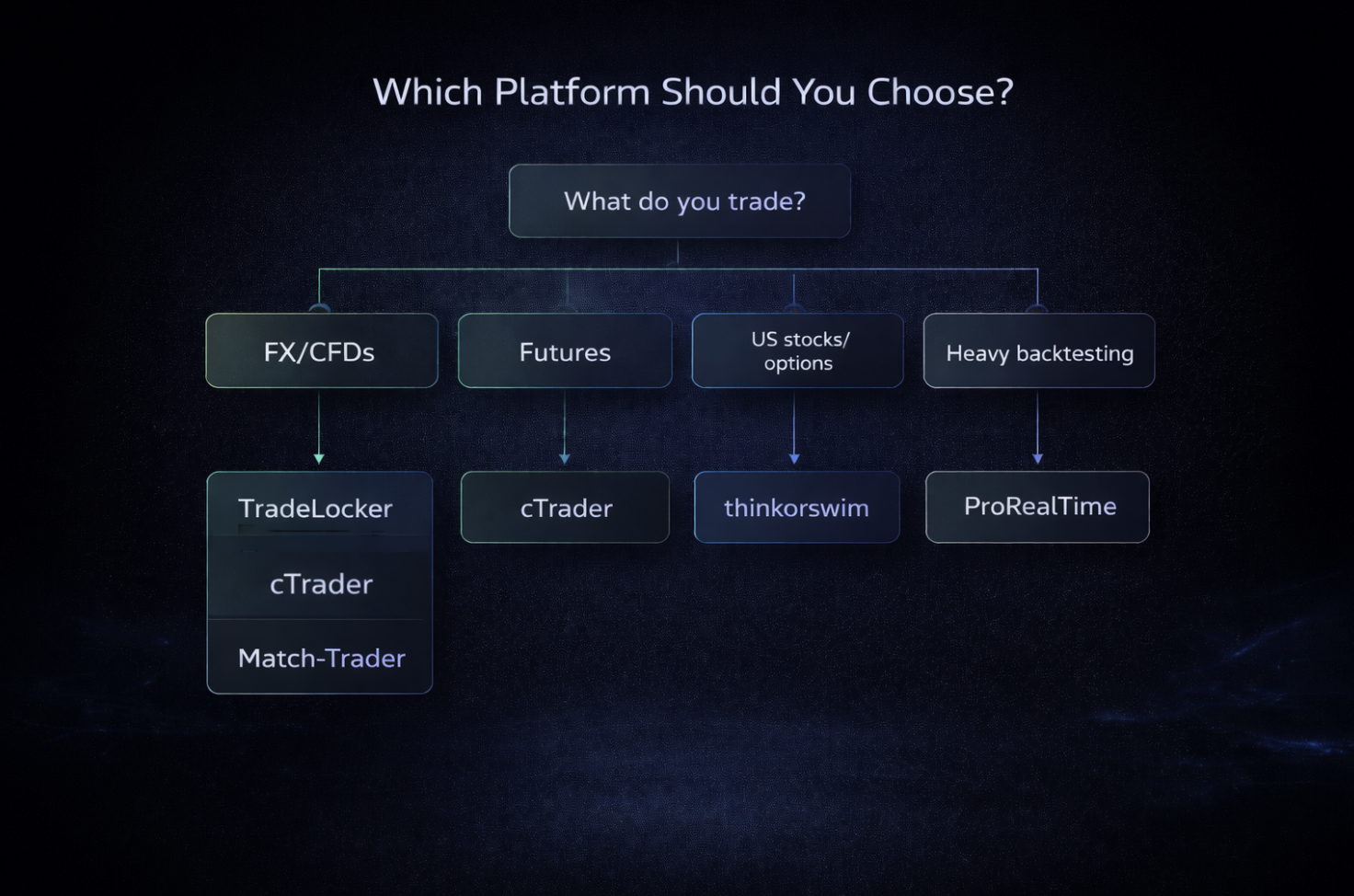
Ask yourself:
- What do I actually trade?
- Mostly FX/CFDs via brokers or props → TradeLocker, cTrader, Match-Trader, MetaTrader.
- Futures → NinjaTrader.
- US stocks/options → Thinkorswim.
- How do I make decisions?
- Chart and price action focused → TradeLocker (TradingView charts), TradingView, cTrader.
- Data/backtest heavy → ProRealTime, NinjaTrader.
- How important is automation?
- Central to your edge:
- cTrader (C#),
- NinjaTrader (NinjaScript),
- ProRealTime,
- MetaTrader (MQL) if you stay.
- Nice-to-have, not essential:
- TradeLocker, Match-Trader, Thinkorswim.
- Central to your edge:
- What frustrates me most about MetaTrader?
- Confusing UI, clutter, old-school feel → TradeLocker is usually the biggest immediate upgrade.
- Backtesting pain → ProRealTime/NinjaTrader as companions.
- Mac / device issues → web-first platforms like TradeLocker and TradingView.
If you’re a prop trader, add:
- “Which platform makes it easiest to respect my daily loss and max drawdown rules?”
TradeLocker’s risk tools and simple interface are built to lean you towards “rule-following” by default.
For Prop Firms: Think in Terms of a Platform Menu
For a prop firm, the right question isn’t “Do we replace MetaTrader?” but:
“What combination of platforms lets us attract the traders we want, manage risk, and stand out?”
A common pattern:
- Keep MetaTrader (if you already have it) for:
- EA-heavy traders,
- long-time MT users who don’t want to switch.
- Add TradeLocker as:
- your flagship, next-gen platform,
- the one you highlight in your marketing,
- the best fit for modern, discretionary traders and funded accounts.
- Optionally add:
- cTrader for advanced ECN/algo traders,
- Match-Trader or similar for full-stack infrastructure.
That way you reduce vendor risk, upgrade UX where it matters most, and still support existing workflows.
For Brokers: Balance Infrastructure with Experience
Brokers have to juggle:
- regulation,
- liquidity,
- white-label and licensing constraints,
- back office and CRM integration.
When you look at MetaTrader alternatives, balance:
- B2B stack needs (risk, CRM, reporting)
- Front-end experience for the end trader
TradeLocker is particularly strong as the front-end experience layer:
- especially for new accounts,
- especially if you want to look and feel different from “MT4 broker #192”.
Pair it with whatever infrastructure makes sense for your business (your own stack, Match-Trader, or other B2B solutions).
How to Transition Away from a MetaTrader-Only Setup
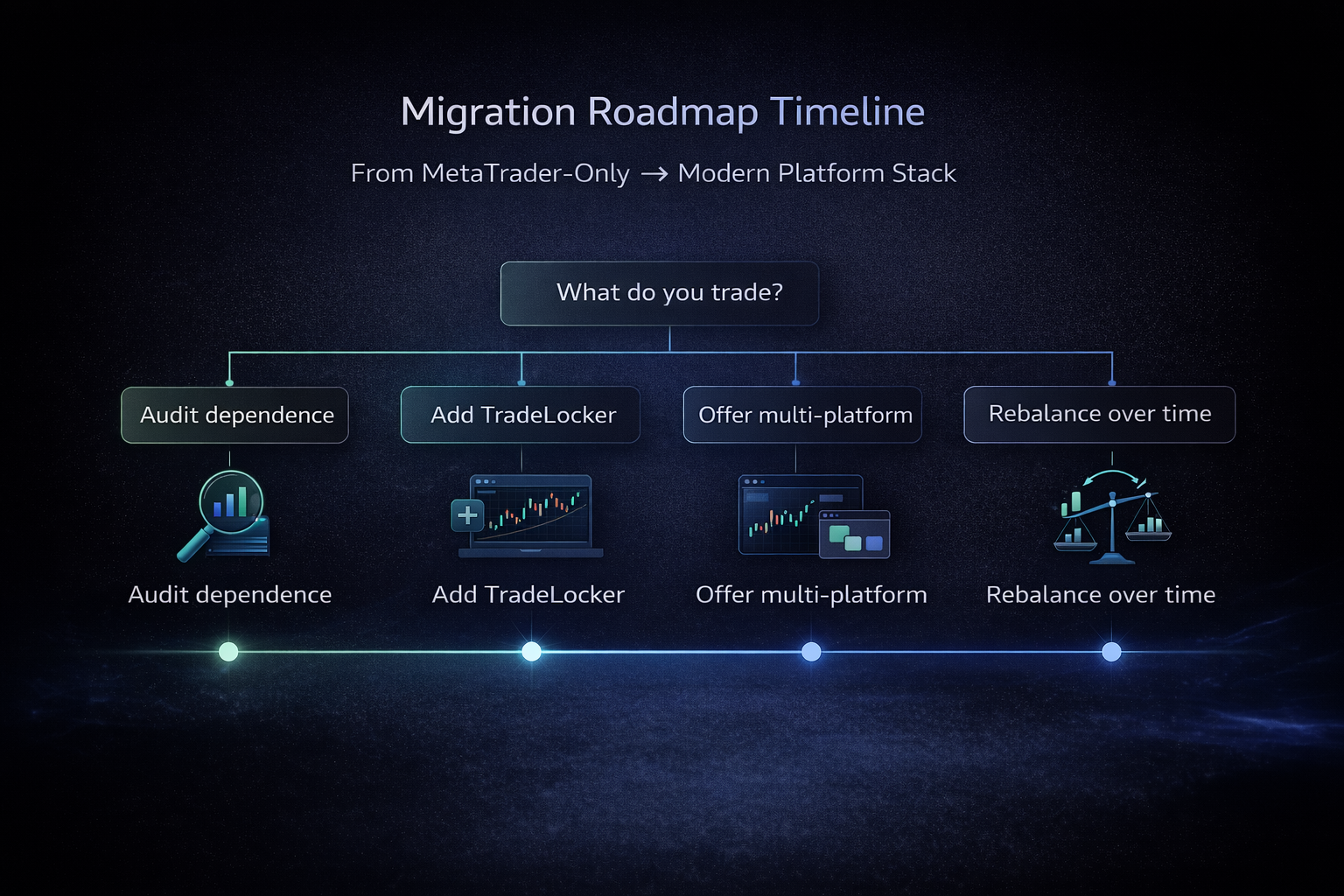
You don’t need to flip a switch overnight. In fact, you shouldn’t.
For Traders: Run a Side-by-Side Trial (with TradeLocker as Your Baseline)
Here’s a simple plan:
- Pick TradeLocker plus 1–2 other platforms
For example:- TradeLocker (your main test drive),
- plus cTrader or ProRealTime / TradingView depending on your style.
- Rebuild your setup
- Same instruments,
- same timeframes,
- similar indicator layouts.
- Trade in demo/live small size for 2–4 weeks
On each platform, pay attention to:- how quickly you can set your risk,
- how calm or stressed you feel placing orders,
- how many “platform mistakes” you make.
- Score them simply:
- Clarity of UI (1–10)
- Ease of risk management (1–10)
- Comfort on mobile (1–10)
- Overall confidence (1–10)
Most traders find that TradeLocker becomes their “home base” pretty quickly if they’re discretionary and prop-style. MetaTrader then becomes a backup or an EA lab, not the main cockpit.
For Prop Firms & Brokers: Move from Single-Platform to Multi-Platform
- Audit your current MetaTrader dependence
- % of clients on MT4 vs MT5,
- share of mobile vs desktop,
- how many depend on EAs,
- how exposed you are to MetaQuotes policy changes.
- Shortlist platforms
- At least one trader-first UX platform: TradeLocker.
- Optionally an all-in-one infra platform: Match-Trader or similar.
- cTrader if you have a big base of advanced FX traders.
- Pilot TradeLocker with a subset of clients
- Invite new signups and a slice of existing clients to use it,
- track satisfaction, volume, support load, and retention.
- Roll out as a menu
- Offer TradeLocker as your recommended default,
- keep MetaTrader for those who need it,
- highlight TradeLocker in your marketing and onboarding flows.
- Rebalance over time
- As more traders choose TradeLocker, your dependence on MetaTrader decreases,
- you gain flexibility to renegotiate licenses, and to shift roadmap and support resources where they make the most impact.
Final Verdict: Should You Replace MetaTrader Completely?
Short answer: not necessarily.
Better answer: you should stop building your trading future around MetaTrader alone.
For traders:
- You don’t have to delete MT4/5.
- But you should seriously test a modern alternative like TradeLocker:
- if you want TradingView-style charts and UX,
- if you’re under prop rules and need rock-solid risk sizing,
- if you’re just tired of fighting your platform.
For prop firms & brokers:
- MetaTrader can stay in your stack.
- But a modern, trader-focused platform like TradeLocker should sit at the center of your experience, not MT4’s 2005-style terminal:
- it gives you differentiation,
- reduces platform risk,
- and matches what next-gen traders expect.
The future isn’t “MetaTrader or something else”. It’s:
MetaTrader where it still makes sense — and TradeLocker as the modern default for everything else.
Next Steps:
1. If You’re a Trader
- Ask your broker or prop firm if they support TradeLocker.
- Open a demo or small live account on TradeLocker and mirror your usual trades from MetaTrader for a couple of weeks.
- Notice:
- how much easier it is to track risk,
- how quickly you can place and adjust orders,
- how much calmer your trading feels.
If after that period you prefer the old terminal… fair enough. But most modern traders don’t go back.
2. If You’re a Prop Firm or Broker
- Map your platform risk and MetaTrader dependence.
- Book a TradeLocker demo and see how it would fit into your current stack.
- Design a staged rollout where:
- TradeLocker becomes the recommended default,
- MetaTrader stays available for those who truly need it,
- other platforms (cTrader, Match-Trader, etc.) fill more specialised roles.
That way, you’re not just “finding a MetaTrader alternative”.
You’re building a future-proof platform stack — with TradeLocker right where your traders spend their time: front and centre.