Ask five traders whether paper trading and demo account mean the same thing, and you will probably get five different answers.
Most people use the terms interchangeably, and most of the time, that is fine. But the two ideas are not identical, and knowing where they overlap, and where they do not, helps you pick the right way to practice before real money is on the line.
Here is the actual distinction between paper trading and a demo account, why it matters, and how to choose the approach that builds skills that hold up once you go live.
What is paper trading?
Paper trading is the practice of simulating trades without risking real money. You choose an entry, a position size, and an exit, then follow how that trade would have performed against real price movement.
The name comes from a pre-digital habit: traders wrote hypothetical trades down on paper and tracked them by hand, entry to exit.
Paper trading rarely means an actual notebook anymore. It usually means placing simulated trades inside a platform, spreadsheet, or app built to mirror market conditions.
The core idea has not changed: you make a real decision, and the market gives you a real answer, but the gains and losses stay hypothetical.
Paper trading describes what you are doing, not the tool you are doing it with. For the fuller breakdown, including how the concept started, we cover paper trading in more depth here.
What is a demo account?
A demo account is the tool most traders actually use to paper trade.
It is an account type offered by a broker or trading platform that gives you a simulated balance, live or near-live market data, and access to the same order types and charting tools you would use with a funded account.
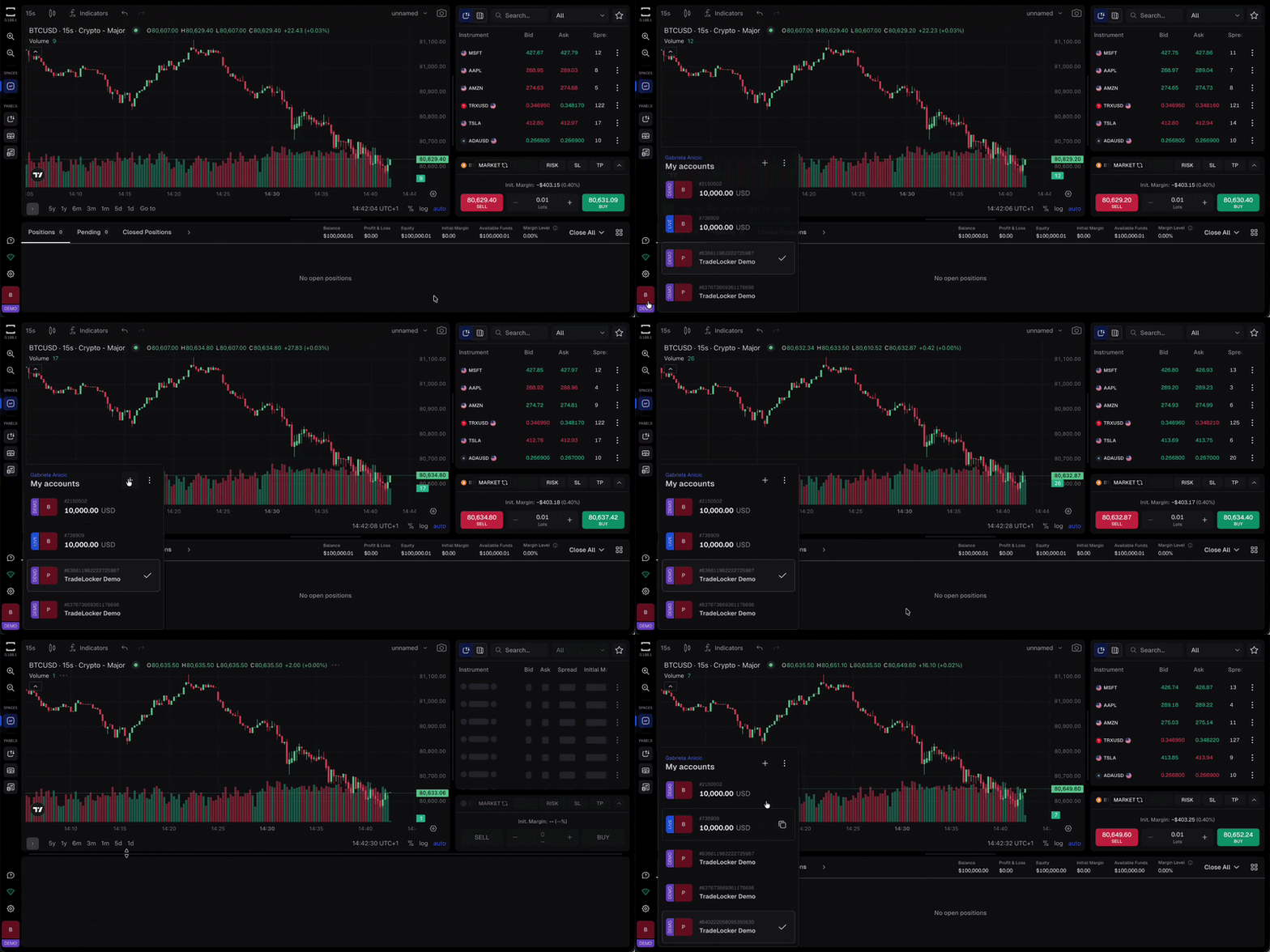
On TradeLocker, a demo account comes with $100,000 in virtual funds and runs on the same infrastructure as a live account: same charts, same order panel, same risk tools.
The only thing that changes when you switch to live trading is that the balance stops being simulated.
Put simply: paper trading is what you are doing. A demo account is where you do it.
Key differences between paper trading and demo accounts
In casual conversation, these terms get used as synonyms, and on a platform like TradeLocker, there is genuinely no meaningful gap between them.
But the two terms are not describing identical things by default, and that gap matters more on some platforms than others.
| Aspect | Paper trading | Demo account |
|---|---|---|
| What it is | A practice method: simulating trades to test decisions | A specific account type provided by a broker or platform |
| Where it happens | Anywhere: a spreadsheet, a notebook, a basic simulator, or inside a platform | Inside a trading platform, tied to real infrastructure |
| Market data | Can be delayed, simplified, or tracked manually | Usually live or near-live pricing, depending on the provider |
| Execution realism | Varies widely; a manual log will not reflect slippage or spread | Should mirror live execution, though quality varies by platform |
| Platform features | Often none beyond an entry, exit, and outcome | Full charting, order types, and risk tools, same as a live account |
| Best for | Testing a strategy’s logic before touching a platform at all | Building platform fluency and real execution habits |
If your practice environment does not include real market conditions and the actual tools you will trade with, you are testing a strategy’s logic, not your ability to execute it under pressure.
That is the distinction that decides which approach actually prepares you for live trading, and it is why we compared how different platforms handle it in our roundup of the best demo trading platforms.
Which is better for beginners?
For most beginners, a demo account is the better starting point, and it is not close.
The reason comes down to execution realism.
A basic paper trading log can tell you whether a strategy’s entries and exits make sense on paper. It cannot tell you what happens when a stop order fills a few pips past where you expected, or how a real order panel behaves when you are moving fast in a volatile session.
Those details are exactly what determine whether a strategy that looks good in theory actually holds up in practice.
A demo account tied to live infrastructure, like TradeLocker’s, closes that gap.
You are using the same charting tools, the same order types, and the same live pricing you would use with a funded account. The platform fluency you build does not need to be relearned later. It transfers directly.
There is also a habit-building argument. Manually logging hypothetical trades takes a level of discipline most beginners have not built yet, which is why paper trading logs tend to get abandoned within a few weeks.
A demo account removes that friction: you place real orders on a real interface, and the platform tracks the results for you automatically.
None of this makes manual paper trading useless. It has a place for stress-testing a rough strategy idea before you touch a platform at all.
But if the goal is building the instincts and habits that carry over to live trading, a live-data demo account is the more honest practice environment, and it is the one that keeps you from picking up the demo trading habits that hold beginners back.

How TradeLocker’s demo account works
Opening a TradeLocker demo account takes about two minutes, and it drops you straight into the same platform you would use to trade live.
Step 1. Go to app.tradelocker.com and select Try Demo.
Step 2. Create your TradeLocker Profile. Sign up with Google, Apple, or email. This profile is your single identity across any demo, broker, or prop firm account you connect later.
Step 3. Start trading. You will land on the platform with a $100,000 virtual demo account ready to go. The DEMO badge in the bottom left corner confirms you are trading with simulated funds, not real ones.
Step 4. Place your first trade. Use the search bar to find an instrument from the full range of markets you can trade on TradeLocker, choose your position size, and hit Buy or Sell. You can set a Stop Loss and Take Profit before confirming using the built-in risk-reward tool, a good habit to build from day one.
From there, you get full access to: live market data, TradingView charting with drawing tools and indicators, and the same risk management tools you would use with real capital.
When you are ready to move to a funded account or a prop firm challenge, you do not start over.
Connect a broker or prop firm directly from your TradeLocker Profile using the credentials they send you, browse the options on the TradeLocker Hub, or work through a prop firm challenge once you feel ready.
Your setup carries over. For the mechanical side-by-side, here is exactly how a demo and live account differ on TradeLocker.
Frequently asked questions
Is paper trading the same as a demo account?
Practically, yes, especially on TradeLocker. Paper trading describes the practice of simulating trades; a demo account is the tool most people use to do it. The two overlap almost completely once you are using a demo account built on live infrastructure. You can find the fuller definition in our glossary entry on paper trading.
Does paper trading or a demo account use real money?
No. Both use simulated balances. Nothing is deposited, and no real money is at risk. On TradeLocker, your demo account uses $100,000 in virtual funds with no deposit required.
Can I open a demo account without a funded account first?
Yes. TradeLocker’s demo account does not require a broker or prop firm account first. All you need is an email address, or a Google or Apple sign-in, and a few minutes.
How long should I use a demo account before going live?
There is no fixed timeline. A useful benchmark is consistency: aim to execute your strategy without breaking your own rules across 20 to 30 trades before moving to a funded account.
Whichever term you use for it, the goal is the same: build the habits and instincts that hold up once real money is on the line.
Start your free TradeLocker demo account and practice on the same platform you will eventually trade live.
Disclaimer: This article is educational and not financial advice.
